Open-source Product
2025 – Present
Taska
A project-management workspace that connects boards, sprints, approvals, automation, releases, and team collaboration. Taska brings planning and delivery workflows together, with optional real-time and GitHub integrations.
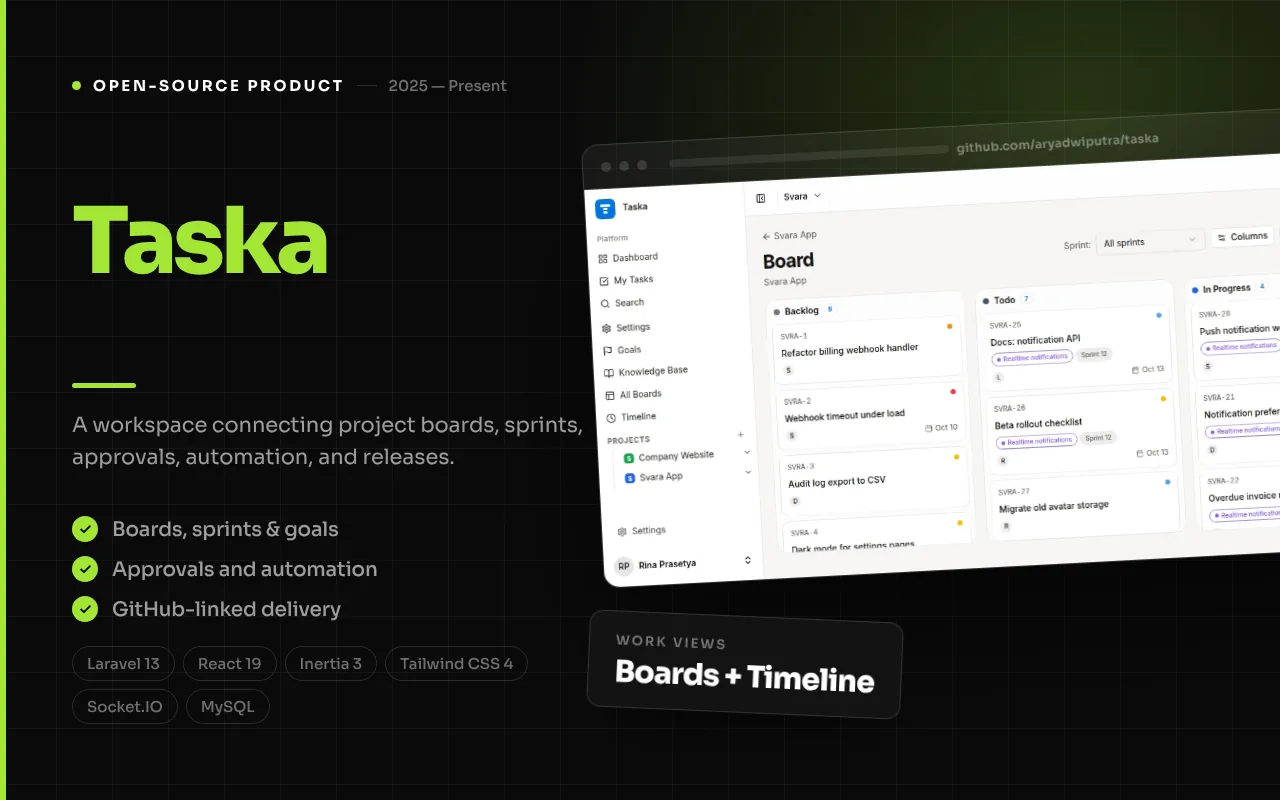
Product overview
How the product fits together
Taska is an open-source project-management application built to give a team a connected place to plan work, coordinate execution, and understand progress. Its central idea is that project work is easier to follow when tasks, board states, sprint plans, decisions, releases, and team activity are part of the same workspace rather than scattered between unrelated tools. A workspace can contain projects, and those projects provide focused ways to organize and review their work.
The product brings familiar task-board interaction together with more structured delivery tools. Teams can organize tasks on Kanban boards, plan a backlog into sprints, group work into epics, define goals, and prepare releases. Cross-project views such as timelines and workload reports help people inspect work beyond a single board. These are complementary views over the same planning problem: what is being done, who is responsible, what is blocked, and how the work connects to a broader outcome.
Taska’s repository describes the product as a Laravel, Inertia, and React application, with a separate Node.js and Socket.IO service for real-time collaboration. It also documents optional integrations such as GitHub and a standalone WhatsApp gateway. The screenshots below are actual Taska showcase images supplied with the project repository. They provide visual evidence for the named interfaces; the accompanying text describes documented behavior and does not imply that optional third-party services are configured in every installation.
The workflow
1
Create a workspace and project
Work begins in a workspace, which provides a shared boundary for a team. Within it, projects give related tasks and planning structures a defined home. Workspace and project roles provide different levels of access, so the product’s documented permission model can distinguish broad workspace responsibilities from project-specific participation.
2
Capture tasks and make the work visible
A team can record work as tasks, place those tasks on a board, and use backlog and board views to move from an unprioritized request toward active execution. Task relationships, comments, attachments, and activity records help keep supporting context near the work item instead of leaving its history only in a chat thread.
3
Plan an iteration or coordinate a larger timeline
For teams using sprint planning, backlog items can be organized into a time-boxed iteration. Sprint reports expose measures such as burndown and velocity in the project documentation. When work spans several projects, timeline and cross-project board views offer another way to inspect sequencing and ownership without treating each board as the entire plan.
4
Coordinate transitions and repeated actions
A task’s movement can be governed by approval flows where a transition requires configured approvers. Automation rules describe trigger, condition, and action behavior for recurring changes such as status, assignment, labels, or notifications. SLA policies add response or resolution targets for task types. These controls are intended to make team conventions explicit; they still need to be designed around the team’s real process.
5
Connect delivery signals and publish releases
Taska documents a GitHub integration that can associate matching commits and pull requests with tasks. With OAuth and webhook configuration in place, incoming repository events can add activity to the related task and support documented auto-close behavior. Completed work can then be grouped into releases, while goals and linked epics give teams a way to relate delivery to higher-level objectives.
6
Review progress and adjust the plan
Reports, workload views, goals, and release progress provide different review lenses. A team can inspect iteration progress, compare distribution of assigned work, or follow the progress of linked work toward an objective. The intent is not to declare that a chart automatically explains delivery, but to keep useful project signals close to the place where the plan is maintained.
Features, with interface evidence
The following screenshots are from the project’s documented interface areas. They illustrate the related modules; integrations and optional workflows may require configuration.
Feature 1
Boards and task collaboration
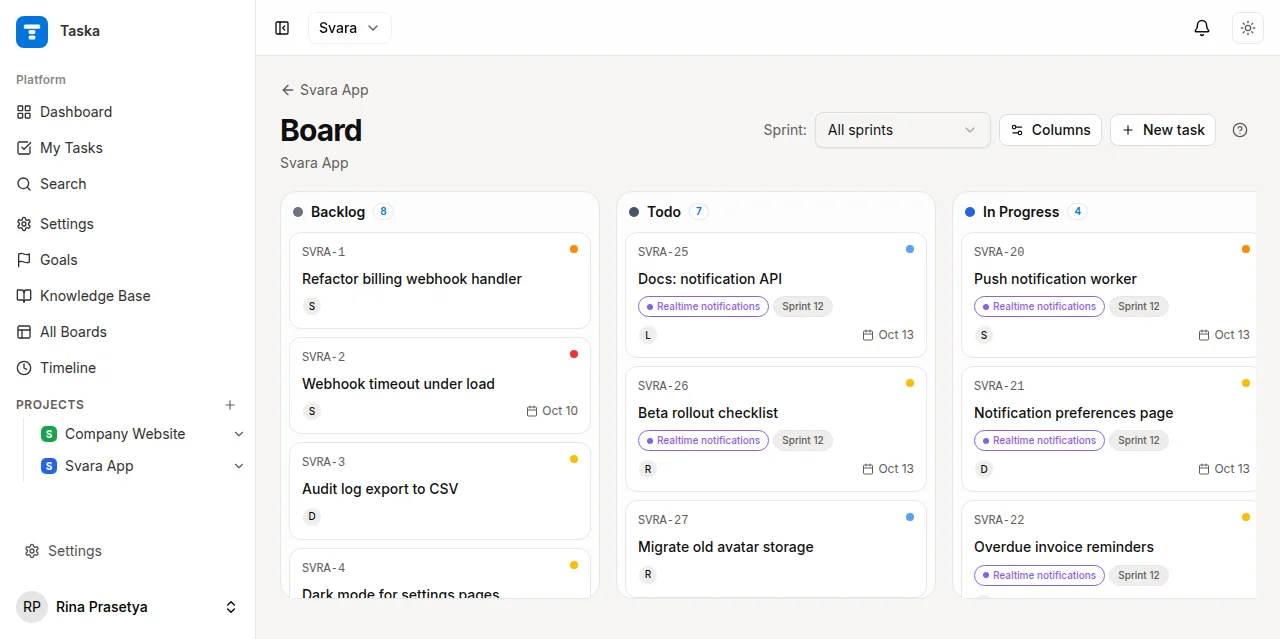
The board is the day-to-day surface for following work through a project. Tasks are represented as items that can move across configured workflow columns, making status visible without opening every record. The README describes drag-and-drop, multiple boards, swimlanes, and work-in-progress limits. A team can therefore shape the board around the way it distinguishes incoming, active, reviewed, or completed work, rather than forcing every project into one fixed sequence.
A task also carries collaboration context. Comments, attachments, task relations, and an activity history keep conversation and supporting materials associated with the item they concern. The separate Socket.IO service is documented as supporting live board updates, typing indicators, and notifications. That real-time capability depends on running and configuring the companion service; the board itself remains the organizational model for the work.
- Multiple Kanban boards, swimlanes, and configurable work-in-progress limits.
- Task creation, movement, comments, attachments, relations, and activity history.
- Documented live updates through the standalone Node.js and Socket.IO service.
Feature 2
Backlogs, sprints, and iteration reports
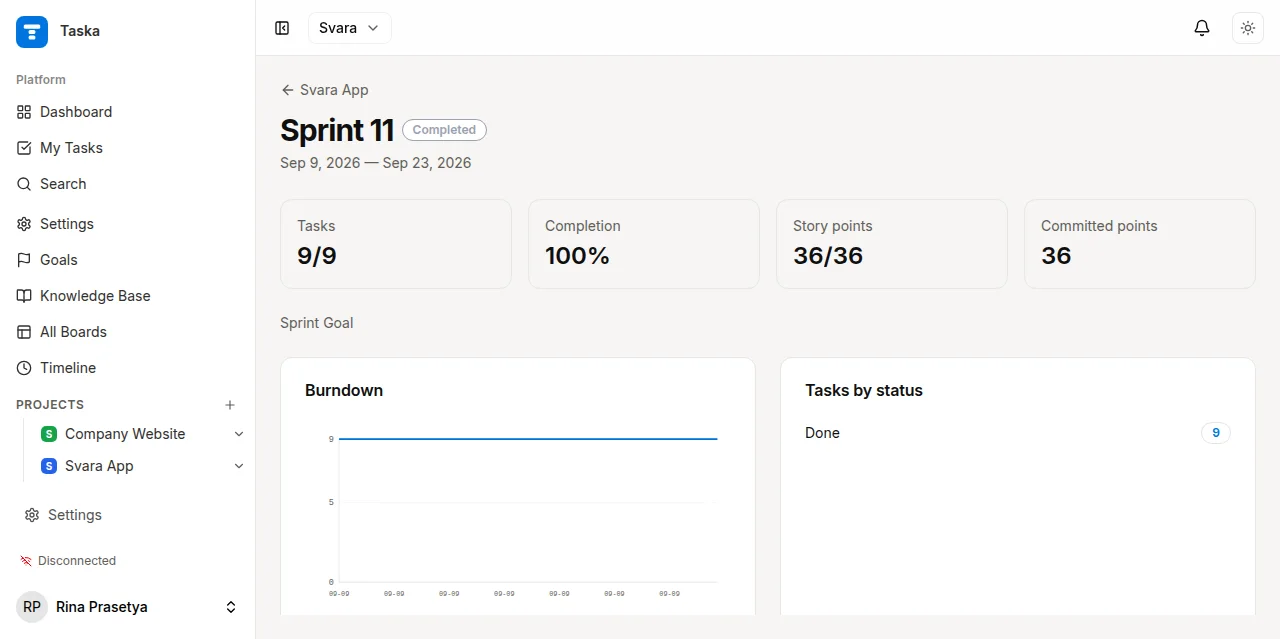
Taska documents a sprint workflow for teams that plan work in time-boxed iterations. A backlog provides a place to collect and shape work before it is committed to a sprint; the sprint then gives the team a bounded set of tasks to execute and review. This distinction is useful because not every task that exists should automatically become an active commitment. Teams can refine priorities first and select work when planning the next iteration.
Sprint reports include burndown and velocity tracking according to the README. These views can support a retrospective by showing the recorded progress of an iteration, but they should be read with the team’s context in mind: scope changes, blocked work, and incomplete estimates affect what a chart can say. The report is evidence for discussion, not a substitute for discussing why the work changed.
- Backlog management and time-boxed sprint planning.
- Sprint start, close, and report workflows documented in the application routes.
- Burndown and velocity views for reviewing iteration progress.
Feature 3
Goals and connected objectives
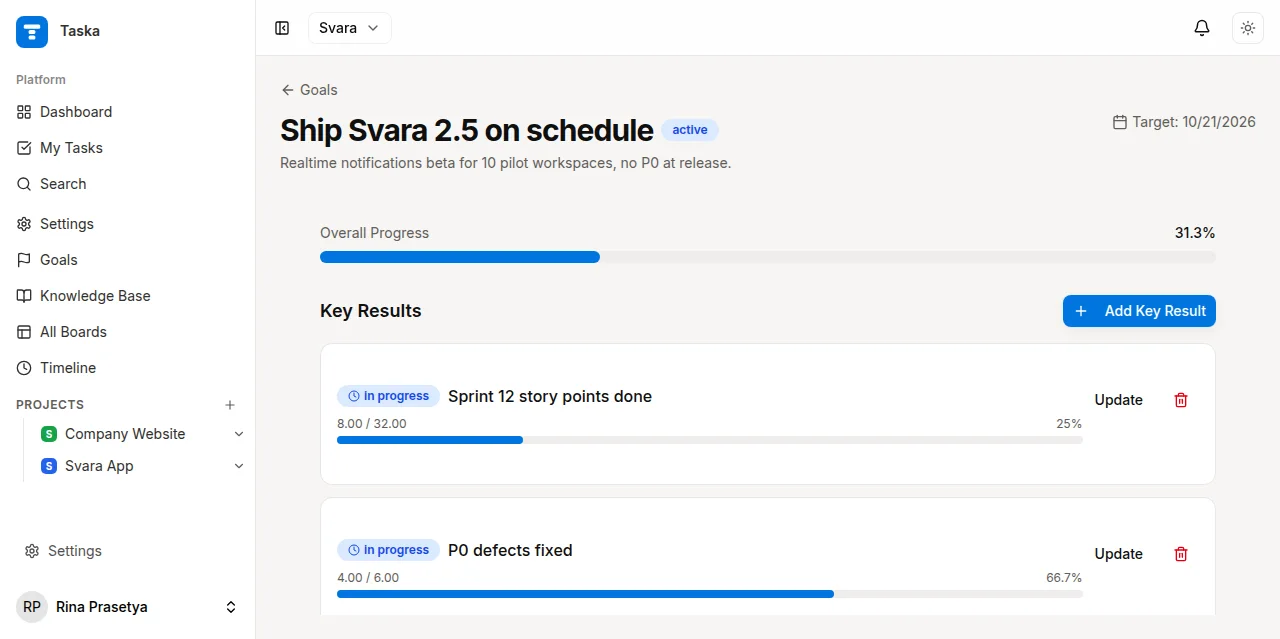
Goals and key results provide a higher-level structure above individual tasks. The README describes goals linked to epics, allowing a team to relate grouped project work to an objective. This helps distinguish activity from outcome: completing tasks is visible, but the goal gives the team a place to state what that work is intended to advance.
The relationship between goals, epics, and tasks is useful when a project contains several contributors or phases. Instead of treating every task as equally meaningful, a team can organize related work and inspect how that body of work contributes to a stated objective. The showcase visual is supplied as a goals interface image; the precise wording and configuration of goals remain under the team’s control.
- Create objectives and key results for project direction.
- Link epics to goals so related tasks can be considered together.
- Review progress at an outcome-oriented level as well as task level.
Feature 4
Releases and delivery grouping
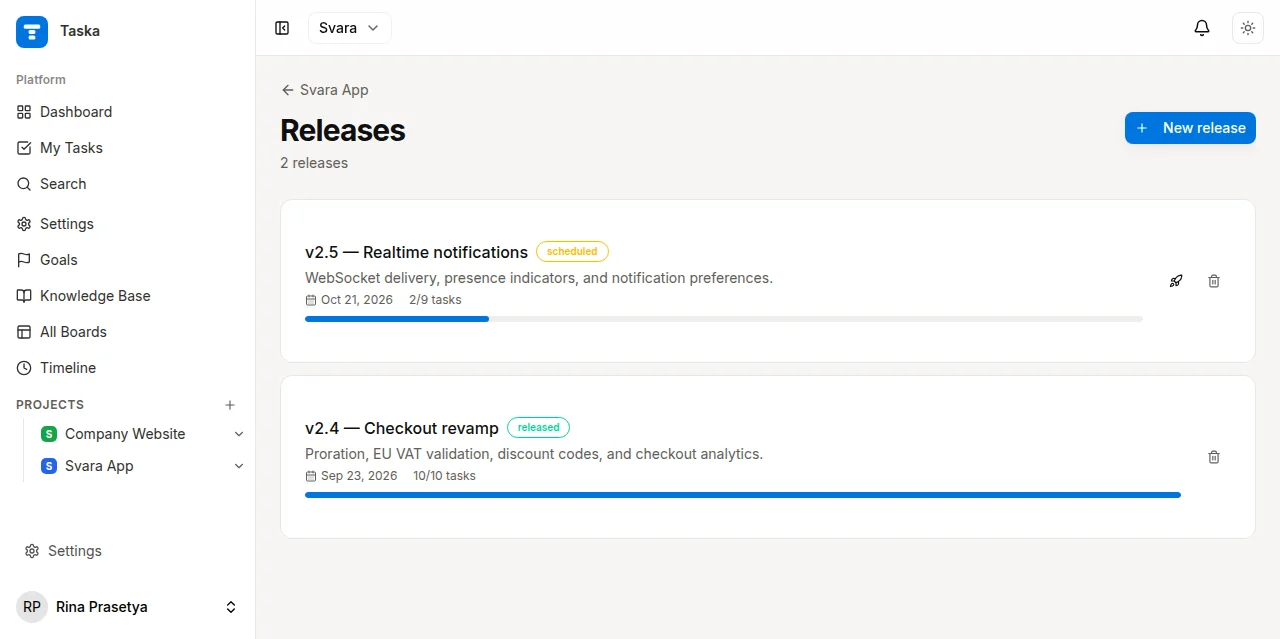
A release groups completed work into a delivery milestone and provides a progress view for that group. The README lists releases as a first-class feature alongside boards and sprints. This gives teams a way to discuss a planned delivery as a coherent set of work, rather than relying only on a stream of individually completed tasks.
Release tracking complements the task workflow: teams can continue managing work at task level while communicating progress at a milestone level. A release view can make the relationship between what is finished and what remains easier to review. It does not itself guarantee a deployment or imply that a release has been published; it is a project-management capability for organizing delivery work.
- Group related work into releases.
- Track progress toward a release milestone.
- Review delivery scope separately from the status of a single task.
Feature 5
Cross-project timeline and workload views
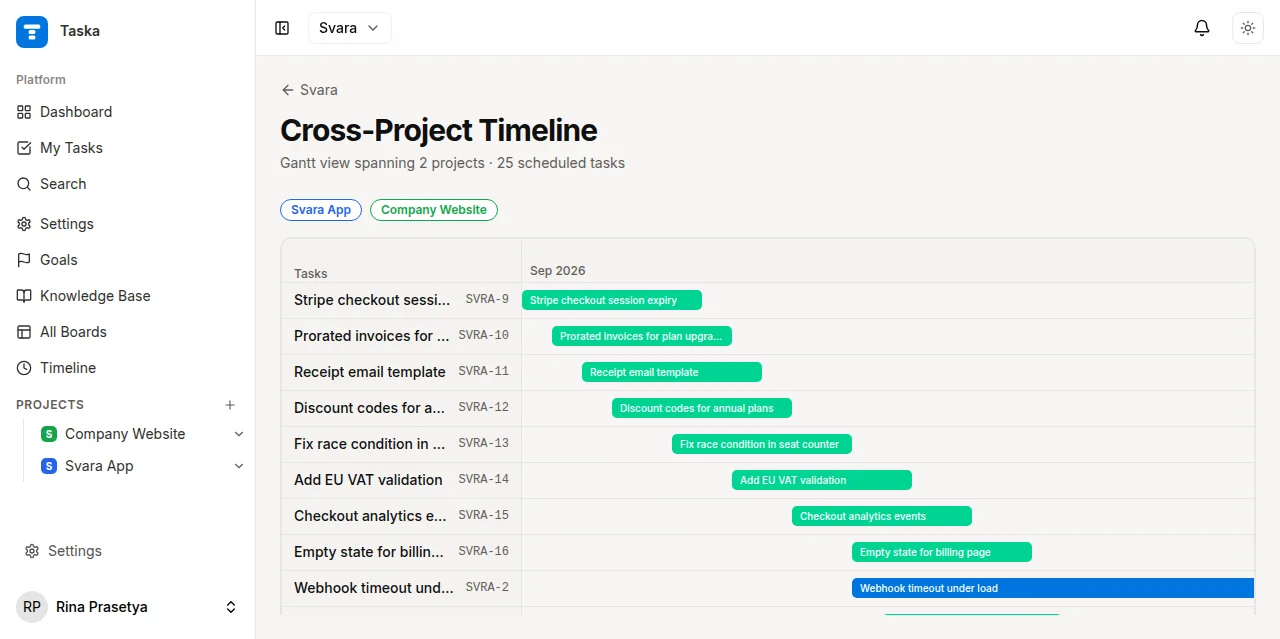
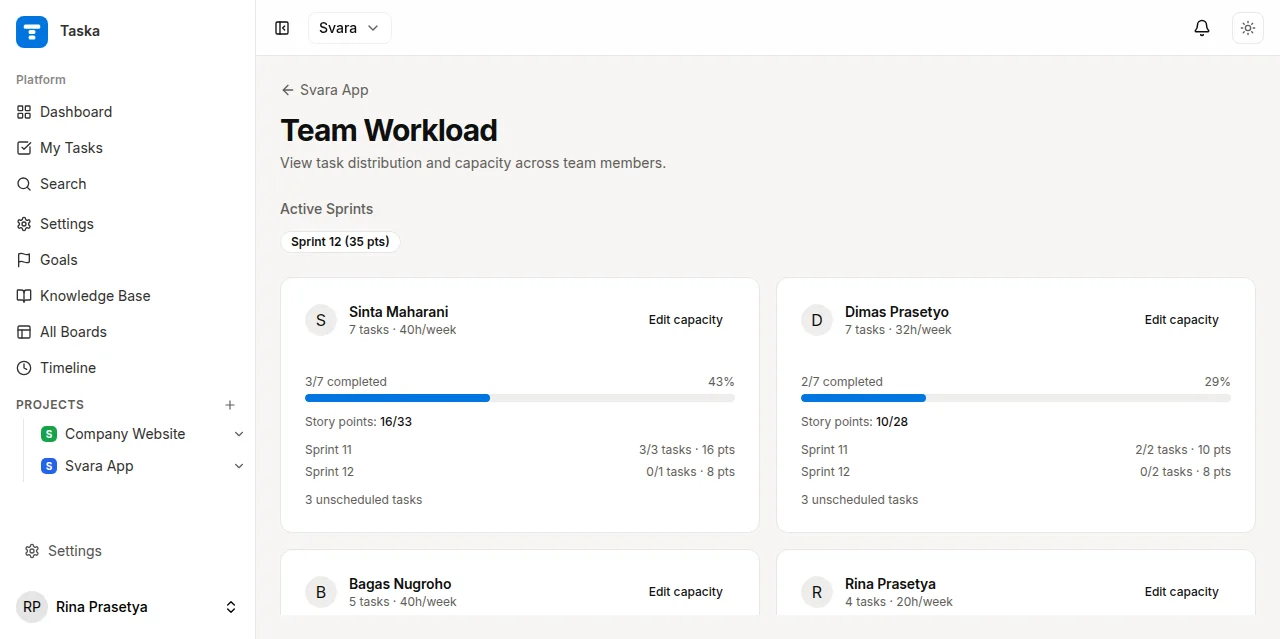
Projects often share people, dependencies, and delivery windows. Taska documents a cross-project timeline described as a Gantt view, as well as workload distribution reports. These views shift attention from the status of one board to the coordination questions that appear across several projects: when work is planned, where ownership sits, and how much is assigned at the same time.
The timeline helps represent sequencing across projects, while workload helps inspect how assignments are distributed. Neither view can determine a team’s actual capacity without accurate inputs and thoughtful interpretation. Their value is that the underlying work can be reviewed together, making possible conflicts easier to notice and discuss before they become surprises.
- Timeline-style planning across more than one project.
- Workload distribution views for reviewing task assignments.
- A broader planning perspective alongside individual project boards.
Feature 6
Approvals, automation, and team controls
Taska includes workflow controls for teams that need more than an informal agreement about how work moves. Approval flows can gate a column transition on configured approvers and a minimum approval count. Automation rules use trigger-condition-action logic to handle repeated updates, such as changing assignment, status, labels, or notifications. SLA policies document response and resolution targets for task types.
These mechanisms are most useful when they reflect a real policy. An approval step should clarify responsibility, not create friction for every task; an automation should save repeated coordination without hiding an unexpected change. Taska also documents workspace- and project-level roles, two-factor authentication using TOTP and passkeys, and notification channels. Their availability in an installation depends on its configuration and the choices of its administrators.
- Configurable approvals for selected workflow transitions.
- Automation rules based on triggers, conditions, and actions.
- SLA targets, role-based access, TOTP, and passkey support documented by the project.
Taska’s broader value comes from connecting these surfaces rather than treating them as isolated checklists. A task can live on a board, be considered during sprint planning, relate to an epic and goal, carry its discussion and activity, and later be grouped into a release. Cross-project timeline and workload views add a wider planning perspective. When configured, GitHub events can add repository activity to the task record, while real-time updates can keep collaborators informed of board changes.
The repository describes a Laravel 13 and PHP 8.3+ backend with React 19, Inertia 3, Tailwind CSS 4, and shadcn/Radix UI. It documents MySQL for production and SQLite for development, a database queue, Laravel Fortify authentication, Pest tests, and separate Node.js services for Socket.IO and WhatsApp messaging. GitHub OAuth/webhooks and the WhatsApp gateway require their respective credentials, secrets, and services; listing them as capabilities is not a claim that they are enabled in every deployment. Taska is released under the MIT license in its repository. The project’s goal is straightforward: keep planning, coordination, and review close enough that a team can understand both the work in motion and the structure around it.