Own Product
Jun 2024 – Present
Dikasir
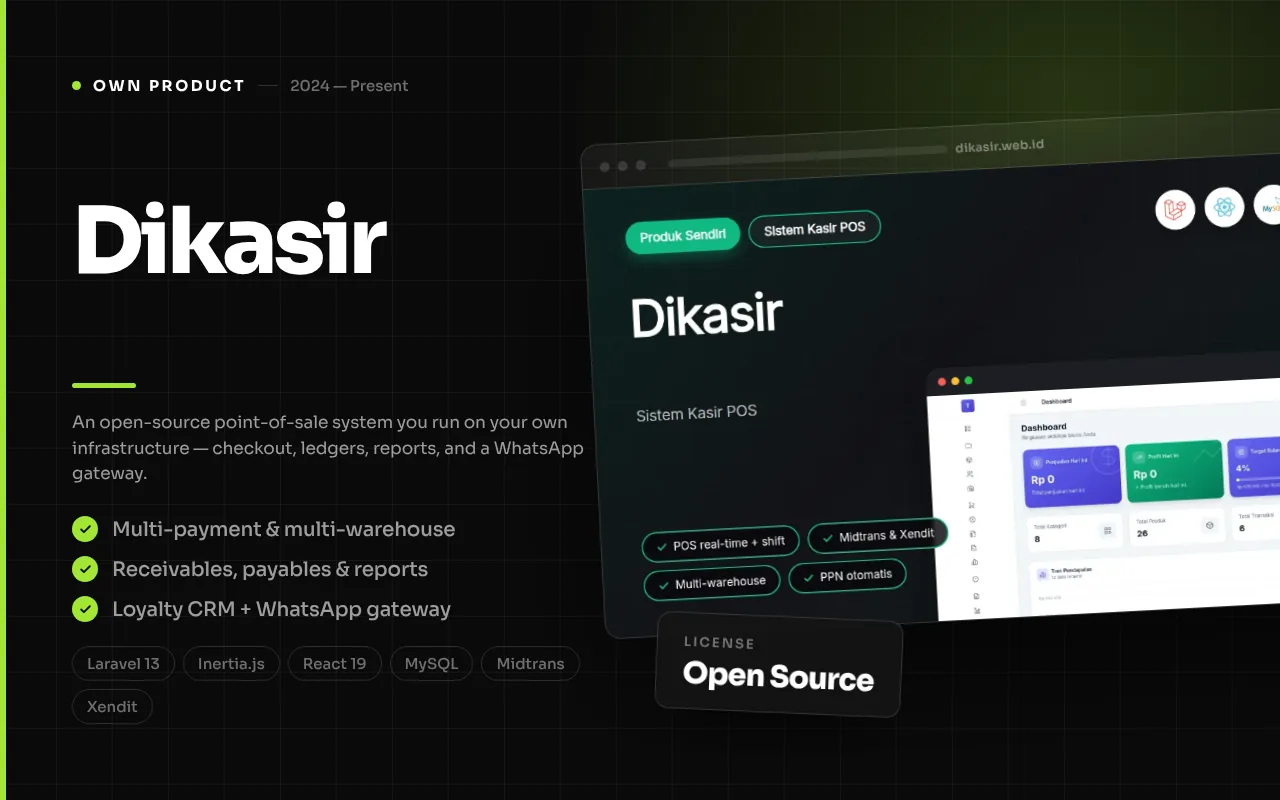
A point-of-sale and retail operations system that connects checkout with shifts, inventory, purchasing, customer balances, and reporting. Its documented workflows are designed to keep day-to-day transactions tied to the stock and financial records they affect.
Product overview
How the product fits together
Dikasir is a point-of-sale and retail operations application built around a practical idea: a sale should not be an isolated record. When a cashier completes a transaction, the business also needs an accurate record of what was sold, which stock changed, how the customer paid, and which shift handled the work. The application brings these connected tasks into one operating flow, then extends that flow into purchasing, customer balances, and reporting.
The product is intended to support more than the moment at the register. Store teams need to prepare products, know where stock is held, receive goods from suppliers, follow money owed by customers or to suppliers, and review how the business is performing. Dikasir documents features for those needs alongside its POS: multi-warehouse inventory, stock counts and mutations, purchase orders and receiving, receivables and payables, customer and pricing tools, and sales and profit reports. The result is a system whose scope follows the lifecycle around a sale rather than stopping at payment capture.
This page describes the capabilities documented in the project repository and illustrates selected screens with screenshots from the application. A screenshot is evidence of the corresponding interface area, not a claim that every optional integration is configured in every deployment. External payment gateways require their own credentials and setup; WhatsApp messaging also depends on its gateway service and connection. Operational features can therefore vary with the installation and configuration in use.
The workflow
1
Prepare the register
A cashier begins by opening a shift and recording the opening cash amount. The documented checkout flow expects an active shift, which gives transactions a clear operational context. Where the store uses warehouse selection, the relevant stock location is selected so sales and inventory movement can be associated with the correct outlet or warehouse. This starting step makes the register state explicit before a sale is entered.
2
Build or resume a sale
The cashier finds products through the POS search or barcode-oriented workflow and adds them to a cart. Quantities can be adjusted as the customer decides what to buy. If the sale needs to wait, the cart can be held and resumed later instead of being discarded or mixed with another checkout. The cart is the working draft; the transaction is not committed until checkout is completed.
3
Choose how the customer pays
At checkout, the cashier selects an available tender such as cash, bank transfer, or a configured payment gateway. The documented system also includes split tender and pay-later flows. Split payment is limited to two tenders and is not available while the POS is operating offline. Pay-later records an amount due so it can be followed through receivables, rather than treating an unpaid balance as settled revenue in the cashier’s hand.
4
Commit the transaction and update records
When checkout succeeds, Dikasir records the transaction and its line details, associates the sale with the active shift, records the corresponding profit data, and adjusts stock for the products sold. This is the central connection in the workflow: checkout creates operational and inventory consequences together. Depending on the transaction and available configuration, the team can then print or share a receipt, invoice, or other customer-facing document.
5
Keep stock and purchasing aligned
Outside the register, staff can review products and stock, record stock counts, inspect mutations, transfer items between warehouses, and manage purchase orders through goods receiving. A stock opname can be prepared as a draft and finalized to reconcile the recorded quantity with the counted quantity; finalization produces a stock adjustment and mutation record. This gives teams a deliberate path from discrepancy to auditable correction instead of hiding changes inside a product edit.
6
Close the shift and review the day
At the end of work, the cashier records actual cash during shift closure. The shift summary compares expected and actual cash and presents the difference alongside transactions and returns associated with that shift. Managers can use sales, profit, and insight reports to review activity beyond one register. The documented force-close action is permission-restricted; a shift is an operational accounting boundary, not an approval workflow.
Features, with interface evidence
The following screenshots are from the project’s documented interface areas. They illustrate the related modules; integrations and optional workflows may require configuration.
Feature 1
Point of sale and transaction handling
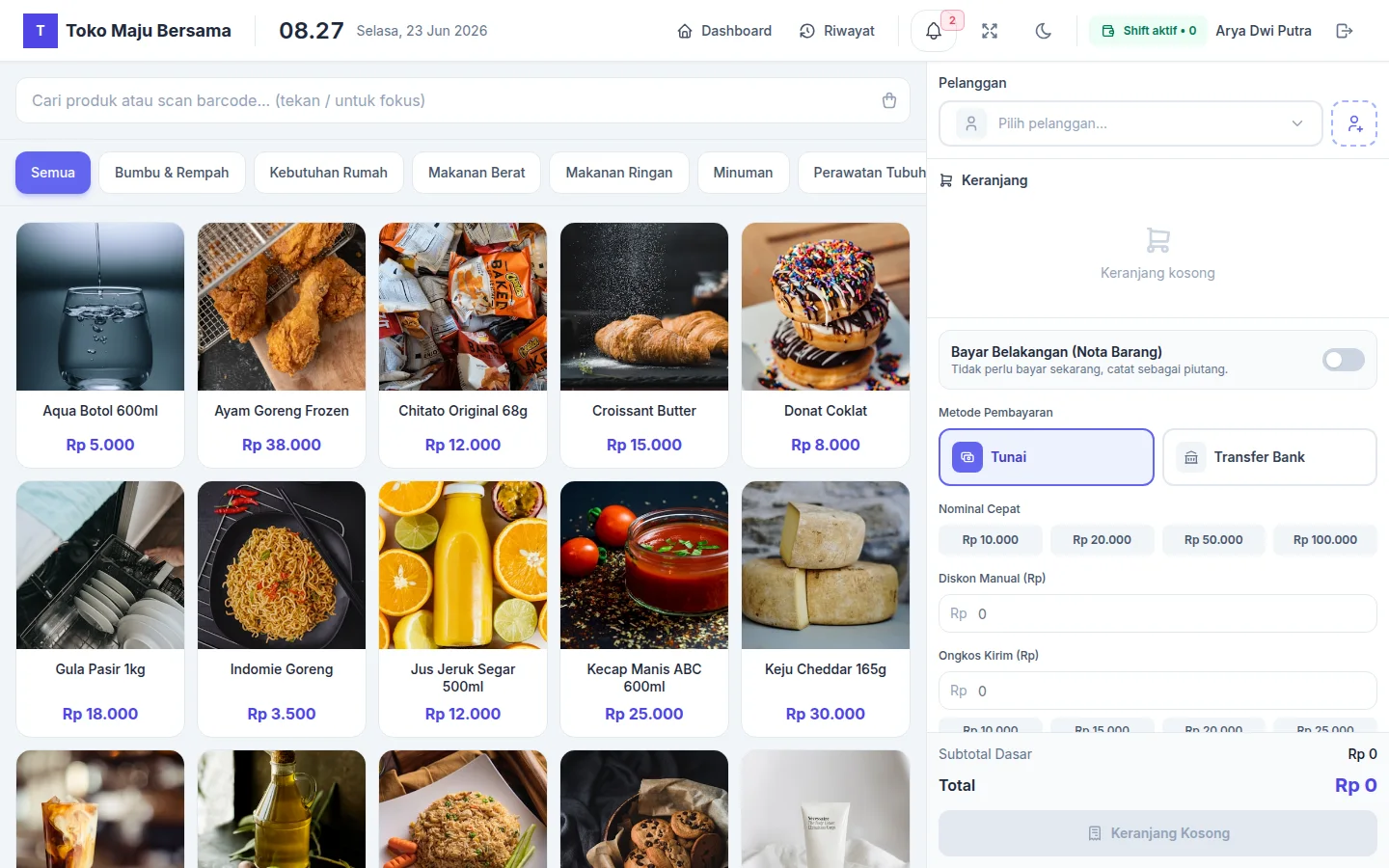
The POS is the system’s daily working surface. Product lookup, barcode-oriented entry, quantity changes, and cart management support the cashier while assembling an order. A cart can be held when the customer needs time or the cashier must briefly switch tasks, then resumed without rebuilding the item list. Customer creation from the POS helps associate a sale with a person when the workflow requires it, while the active-shift requirement keeps checkout tied to an opened register session.
Payment options documented by the project include cash, bank transfer, configured Midtrans or Xendit payments, split tender, and pay-later. The exact choices shown depend on store settings and gateway configuration. A completed checkout creates transaction records and details, affects stock, and contributes to the financial reporting data. The application also documents receipts, invoices, shipping labels, public invoice sharing, sales returns, refunds, and store credit. These capabilities cover both the original sale and several common follow-up events without reducing them to an informal note.
- Product search and barcode-oriented checkout
- Editable multi-item cart, hold, and resume
- Cash, bank transfer, configured gateway, split tender, and pay-later options
- Receipts, invoices, shipping labels, and public invoice sharing
- Returns, refunds, store credit, and customer records
Feature 2
Shifts and cash reconciliation
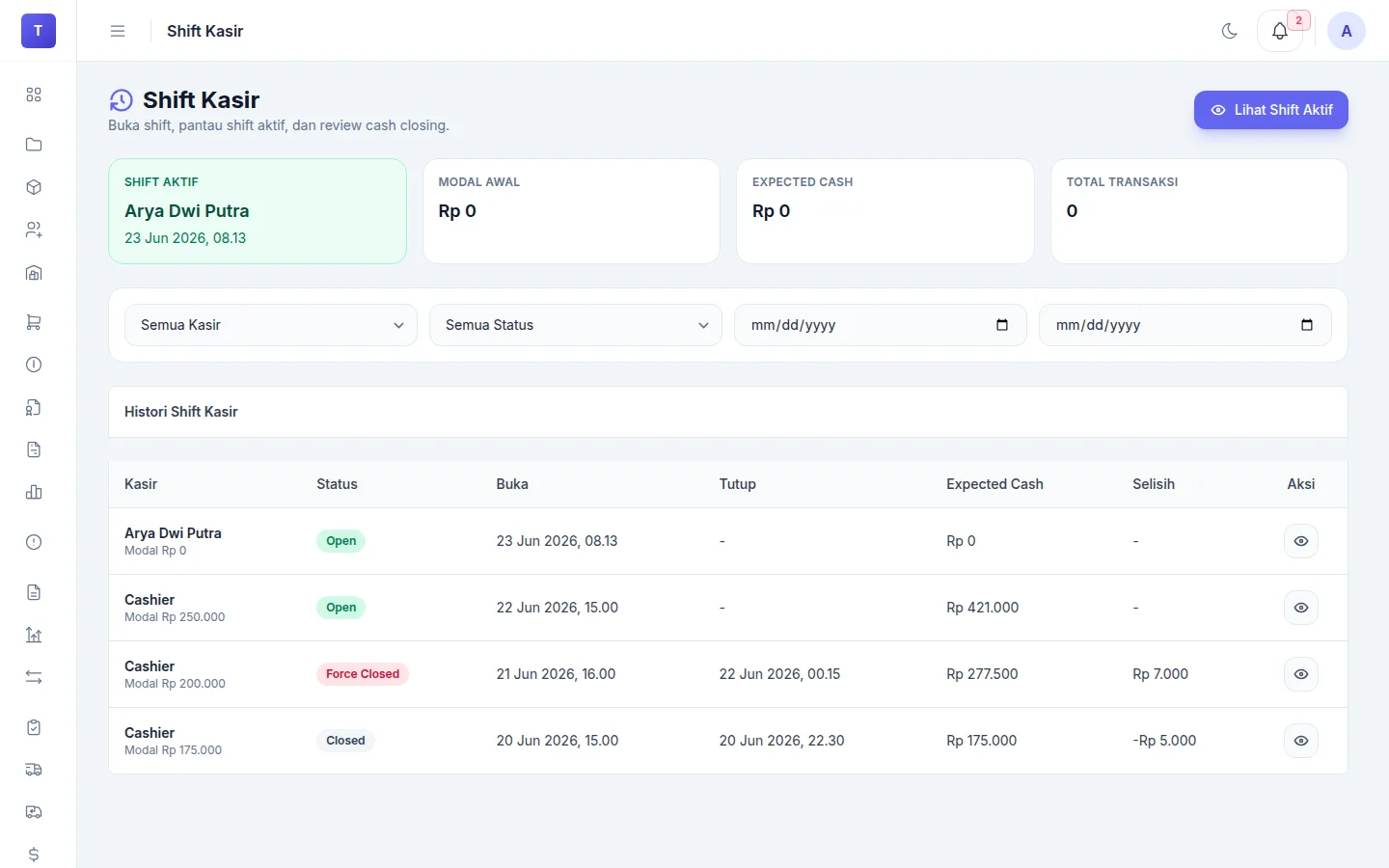
Shifts provide a boundary for register activity. Opening a shift records starting cash, and checkout operations depend on an active shift. At close, the cashier enters the counted cash and reviews the system’s expected amount and variance, together with the shift’s transactions and returns. This makes it possible to investigate a difference against a defined period of work instead of comparing a drawer against an entire day’s activity with no context.
The repository also documents shift listing and detail views, as well as a privileged force-close action. The distinction matters: force-close is an administrative capability governed by permissions, not the ordinary cashier’s reconciliation path. The shift screen shown here is evidence of that operational area; exact policies should be checked against the permissions and settings in the deployed instance.
- Opening cash and active-shift tracking
- Transactions and returns associated with a shift
- Expected-versus-counted cash and variance summary
- Permission-restricted force close
Feature 3
Inventory, counts, and multiple warehouses
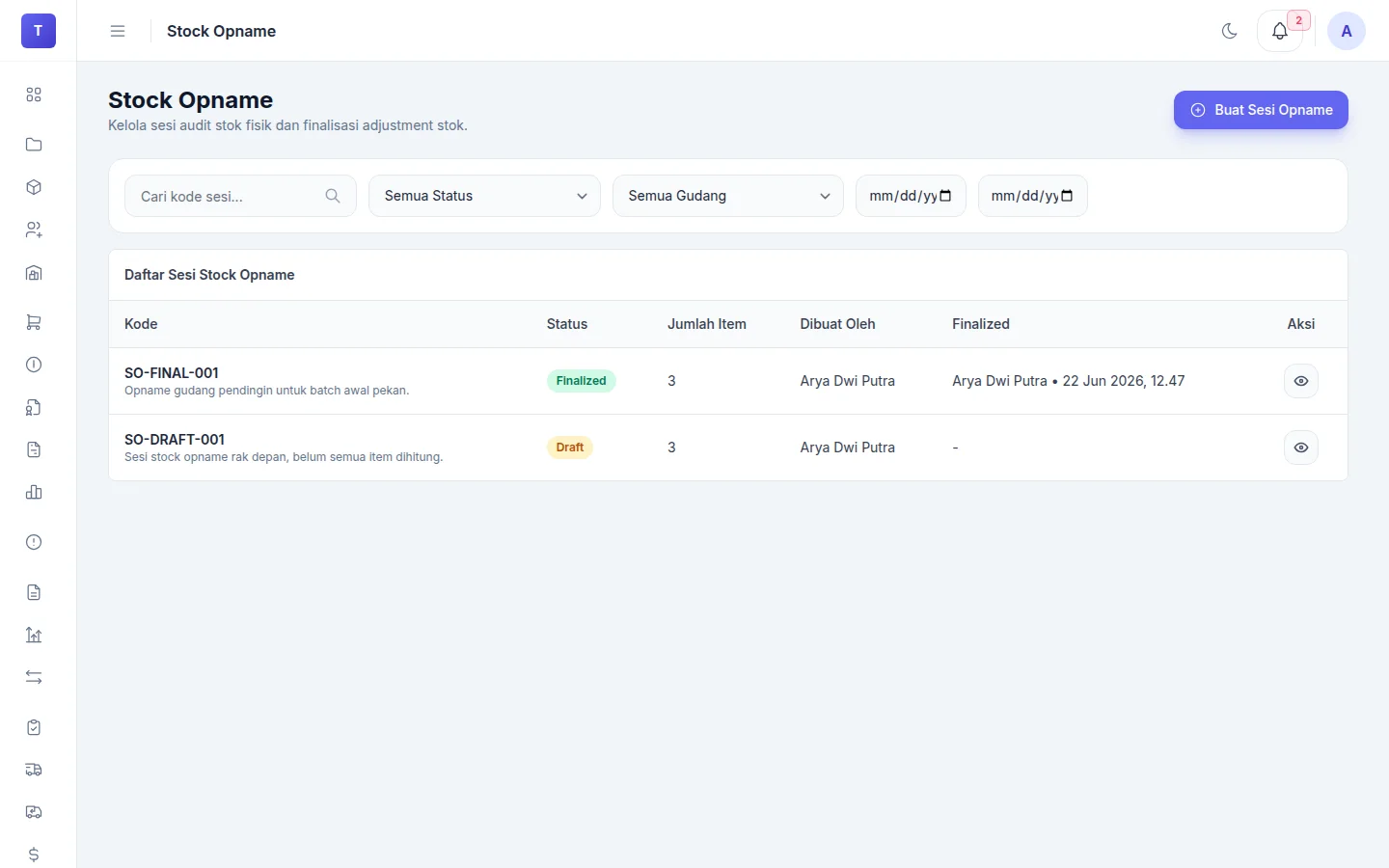
Inventory features extend the sale record into stock operations. The documented product workflow supports product and category management, initial stock, stock mutations, stock opname, low-stock notifications, and stock held across multiple warehouses. Transfers support movement between locations, while mutation history provides a record of adjustments. These are separate operational tasks: changing a product description is not the same thing as changing the quantity on hand.
For more involved stock models, the feature index also lists batch and expiry tracking with FEFO allocation, composite products, reorder points, and unit conversion. Stock opname follows a draft-and-finalize path: a team can prepare a count, review it, and finalize the reconciliation, which adjusts stock and creates a mutation record. The screenshot below shows the stock-opname area; the other capabilities are documented features and may require the appropriate product setup.
- Products, categories, initial stock, and low-stock notices
- Stock opname, mutation history, and adjustments
- Multiple warehouses and inter-warehouse transfers
- Documented batch, expiry, FEFO, composite-product, and unit-conversion support
Feature 4
Purchasing and supplier operations
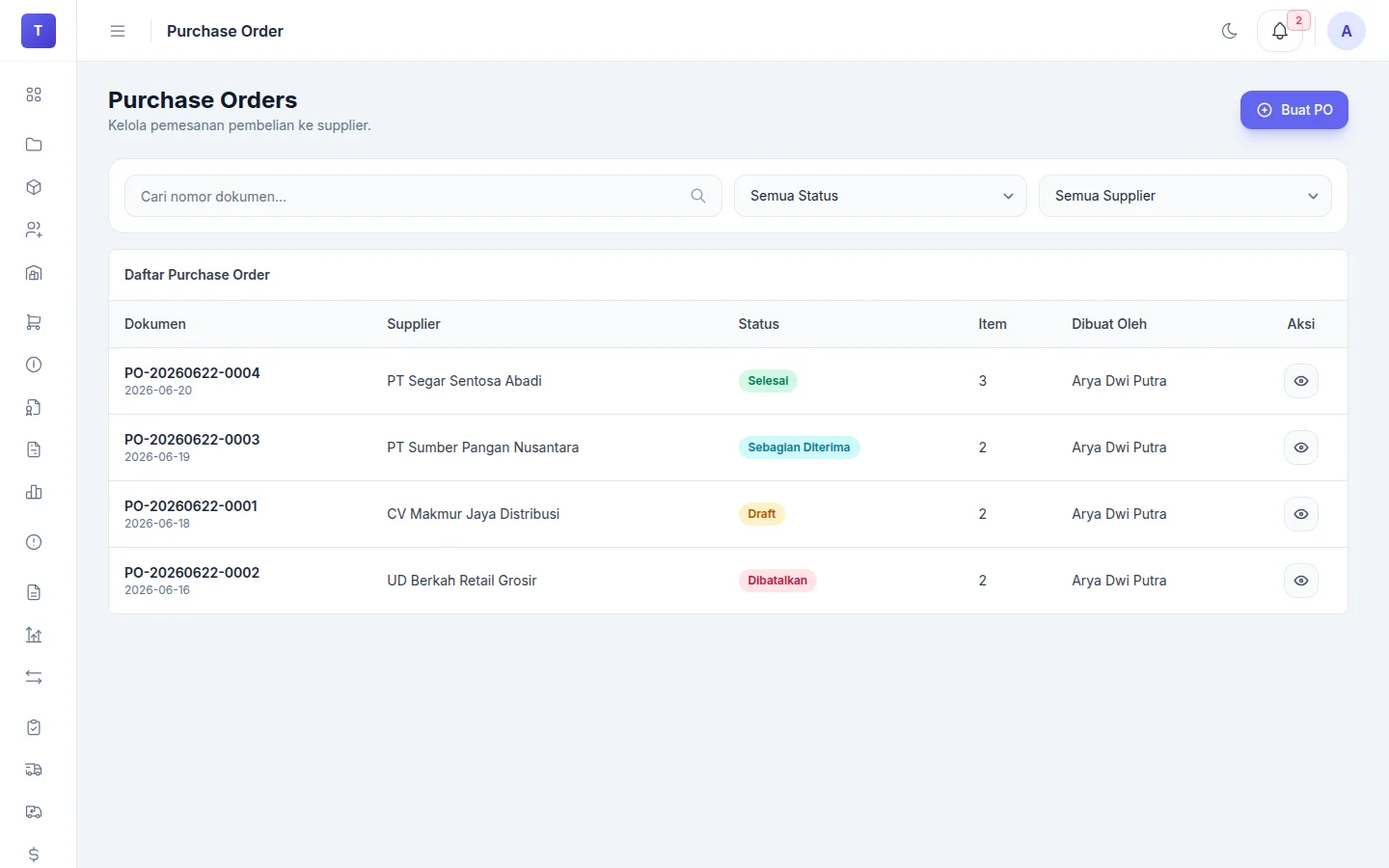
Retail stock has an upstream lifecycle as well as a checkout lifecycle. Dikasir documents purchase orders, goods receiving, and supplier returns so a team can track what it intends to buy, what has arrived, and what must be sent back. Receiving is an important bridge between procurement and inventory: it gives the store a defined point to record incoming goods rather than relying only on a manually edited stock total.
Supplier management and payable records connect purchasing to cash obligations. The screenshots provide evidence of the purchase-order workspace, while the feature index lists the related receiving and return areas. This makes the operational model easier to understand: a purchase begins as an order, is checked against received goods, can be corrected through a supplier return, and may create a payable that finance staff then monitor.
- Purchase orders and goods receiving
- Supplier records and supplier returns
- Payables created and monitored as financial obligations
- Inventory replenishment connected to warehouse stock operations
Feature 5
Receivables, payables, and customer balances
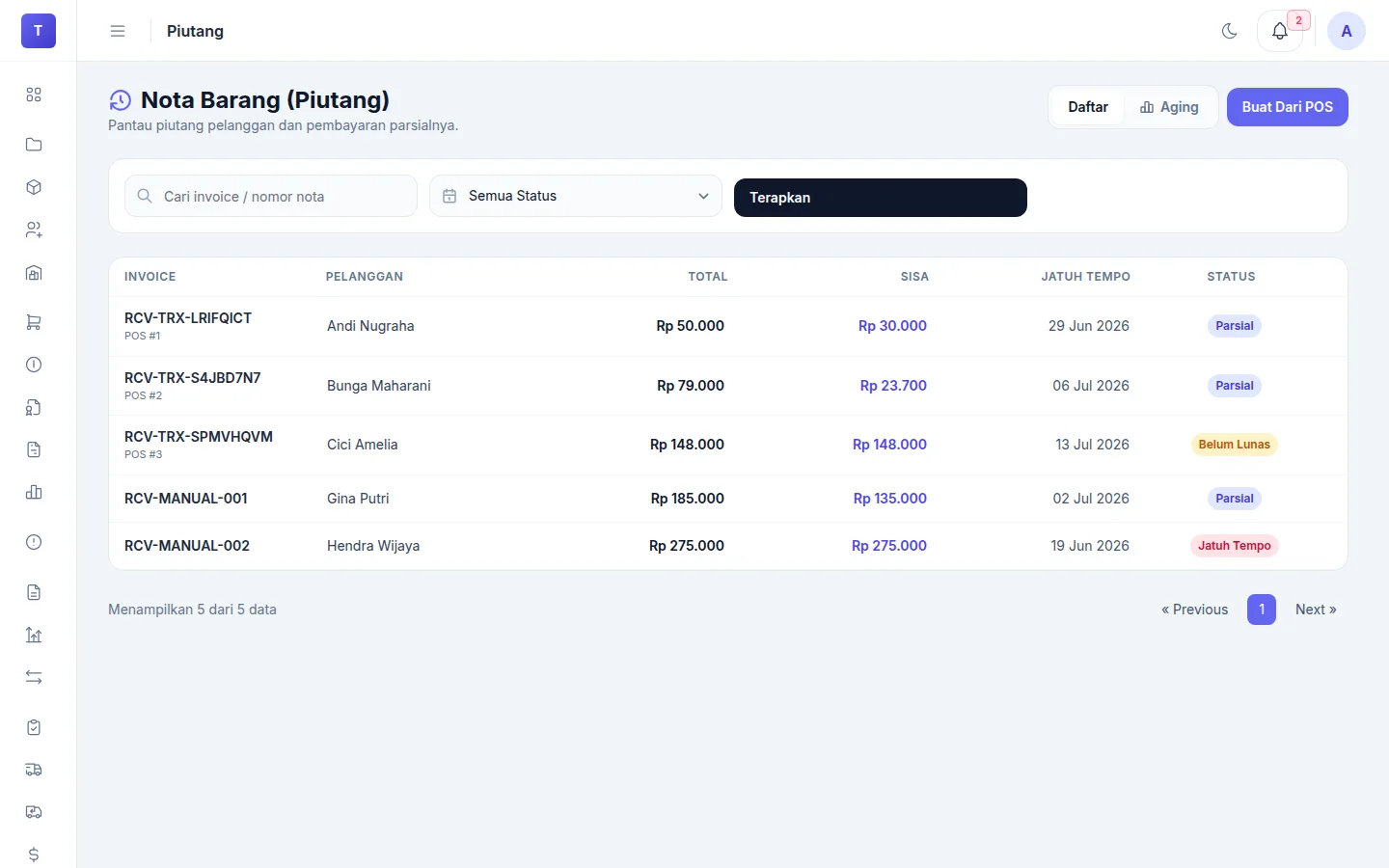
Not every sale is settled immediately, and not every supplier invoice is paid at receipt. Dikasir documents receivables and payables as separate parts of its financial operations. A pay-later checkout creates a receivable that can be followed up, and customer balances can be reviewed through the receivables area. On the supplier side, payables represent amounts the business needs to settle. The repository also lists aging information to help teams inspect how long balances have remained outstanding.
This distinction keeps a point-of-sale application useful beyond cash-and-carry transactions. The cashier can record the commercial event while finance staff continue the collection or payment process in the appropriate module. Screenshots below show the customer-receivable view; the project also includes payables and aging screens. Availability and payment methods depend on the configured store workflow, so this description does not imply that a specific payment has been collected or a particular reminder service is active.
- Customer receivables and supplier payables
- Pay-later checkout recorded as an amount due
- Balance monitoring and documented aging views
- Payment and reminder workflows subject to configuration
Feature 6
Reporting and business review
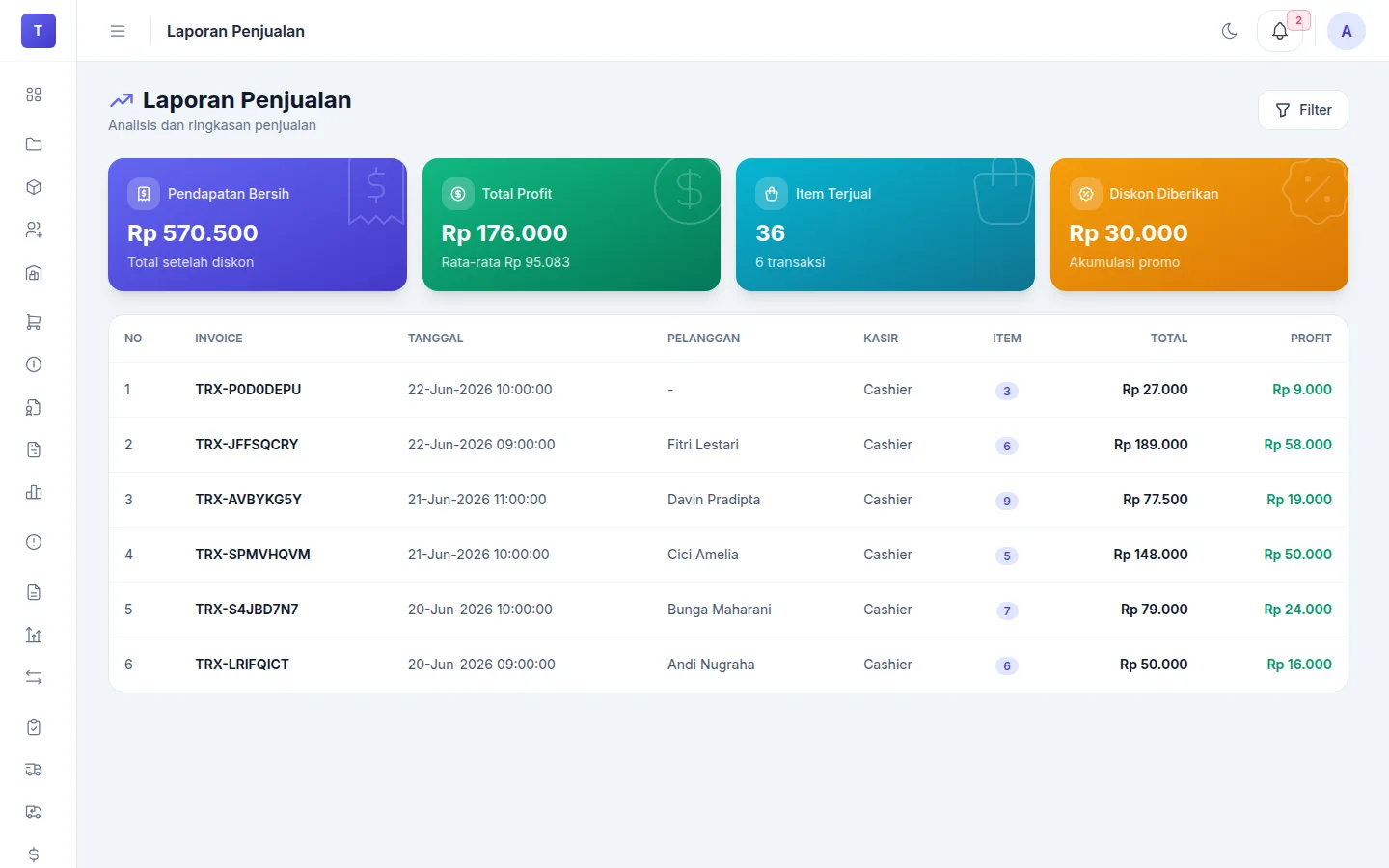
A transaction system becomes more useful when its records can answer operational questions. Dikasir documents sales, profit, and insight reports, with export options that include PDF, CSV, and Excel workflows. Teams can use sales reporting to review transaction activity and profit reporting to inspect recorded margin data, while insight views offer another way to examine the business information collected by the system.
Reports are only as meaningful as the underlying records and configuration. Dikasir ties checkout to transaction details, shifts, and stock changes, giving reporting modules structured events to summarize. The screenshot shown here is the sales-report area; it demonstrates the reporting interface, not a promise of any particular performance result or business outcome. The project also documents audit logs and import/export workflows for operational oversight and data movement.
- Sales, profit, and insight reporting
- Documented PDF, CSV, and Excel output or data workflows
- Audit-log support for operational review
- Reports based on recorded transactions and configured data
Beyond these primary flows, the repository documents customer and member records, loyalty tiers and points, pricing rules, vouchers, price lists, customer segments, campaigns, and reminders. It also lists dine-in and QR ordering, a customer portal, offline POS queue and synchronization, mobile PWA support, and thermal printing. These capabilities broaden the product from a register into a set of tools for store operations and customer follow-up; they should be enabled and evaluated according to a particular business’s needs rather than assumed to be active everywhere.
Dikasir’s architecture combines Laravel with Inertia.js and React, with MySQL and Tailwind CSS in the listed stack. Midtrans, Xendit, and WhatsApp Gateway appear as integration technologies, but they depend on external credentials or services. In particular, split tender has a documented two-tender limit and is unavailable offline. By describing the constraints alongside the capabilities, this case study aims to show the system as it is documented: a connected retail workflow spanning register, inventory, purchasing, balances, and review, not an unqualified promise that every module is ready in every deployment.