Travel Platform
Laravel learning project
Nomads Travel Agency
A travel-agency web application for discovering packages, organizing traveler details, and managing bookings through user and administrator workflows.
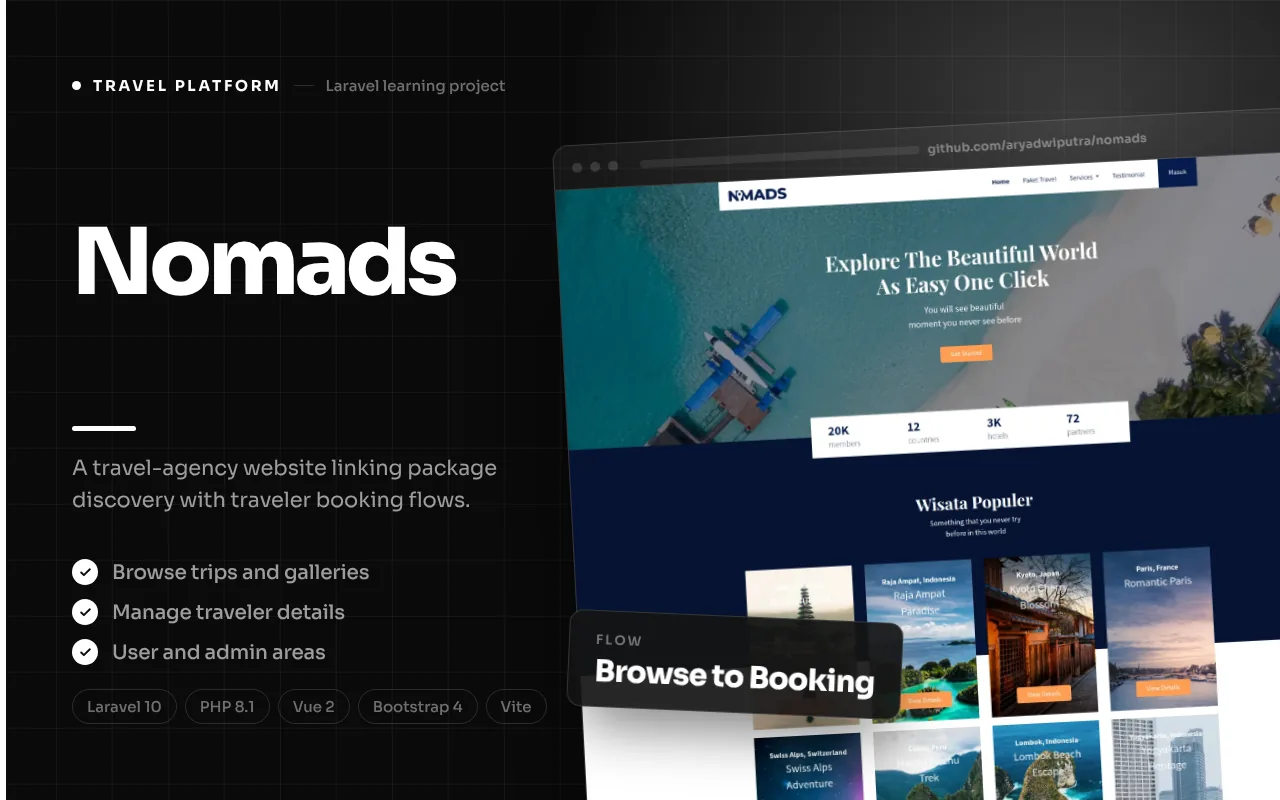
Product overview
How the product fits together
Nomads is a travel-agency website built around the path from browsing a trip to managing its booking. The repository README describes it as a Laravel learning project, so this case study presents it as an implemented portfolio application rather than claiming it is a commercial travel service. Its pages organize travel packages, package details, traveler information, account access, and administrative management into a familiar web flow.
The public experience starts with a collection of travel packages and their supporting imagery. A visitor can open a package detail page to review its description, gallery, departure information, duration, trip type, and price before joining the booking process. The screens are supported by Laravel models for travel packages, galleries, transactions, transaction details, and users, which give the application a defined structure for its content and booking records.
The project pairs a Laravel backend with Blade-rendered pages and a Bootstrap-based interface. The local repository includes nine product screenshots, which are used below to document the screens available in the source project. They are presented as application screenshots, not as evidence of a live deployment. Some implementation limitations are also visible in the code and are described rather than hidden: the checkout uses a manual payment-confirmation step, and several authorization and data-flow details need review before production use.
The workflow
1
Browse available trips
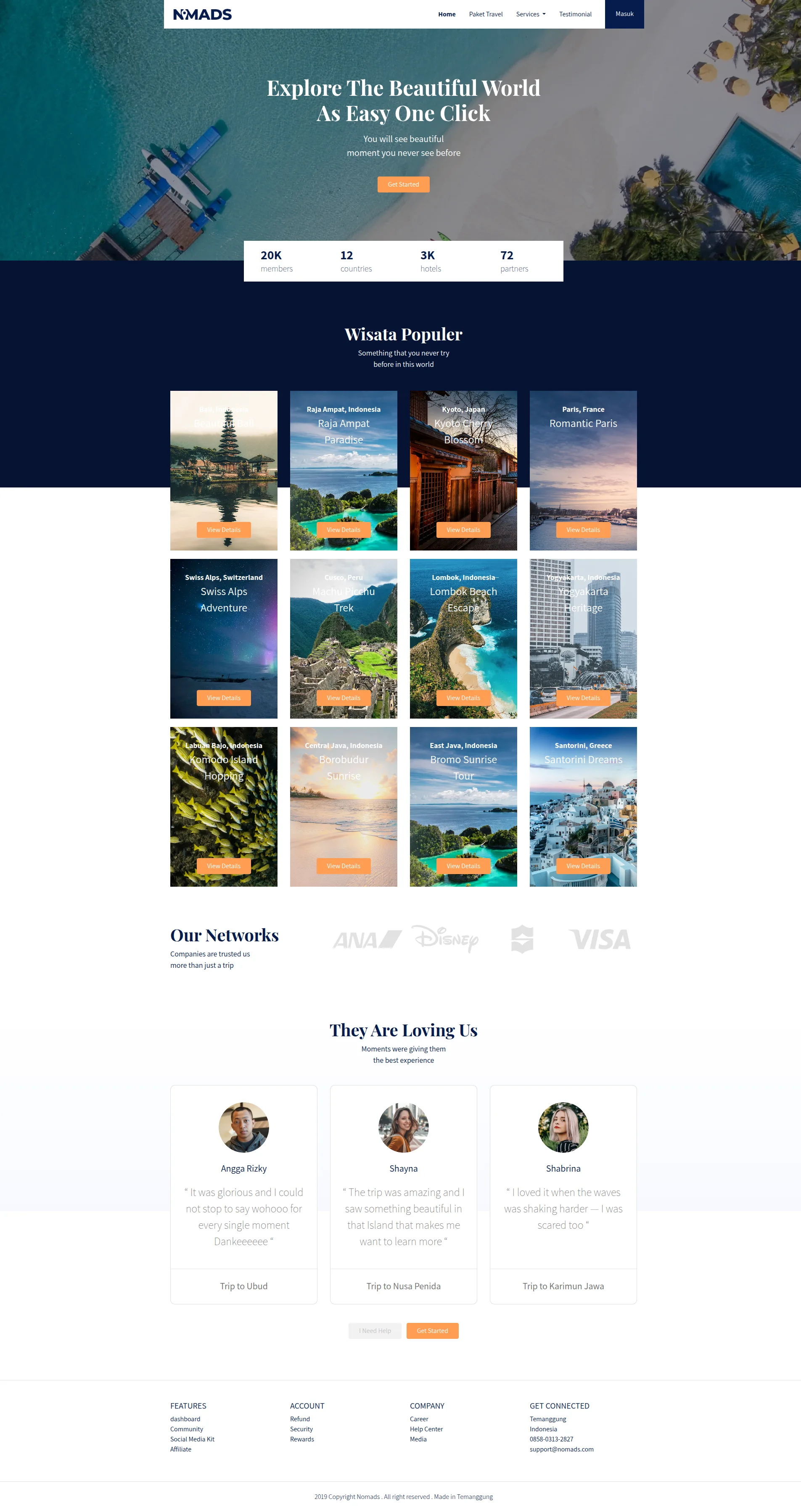
The home controller loads travel packages and gallery content for the landing page. Package cards provide a starting point for visitors to compare available options and move into an individual package page. The homepage also contains static promotional and testimonial content, so those sections should be understood as page presentation rather than dynamically verified customer feedback.
2
Review package details
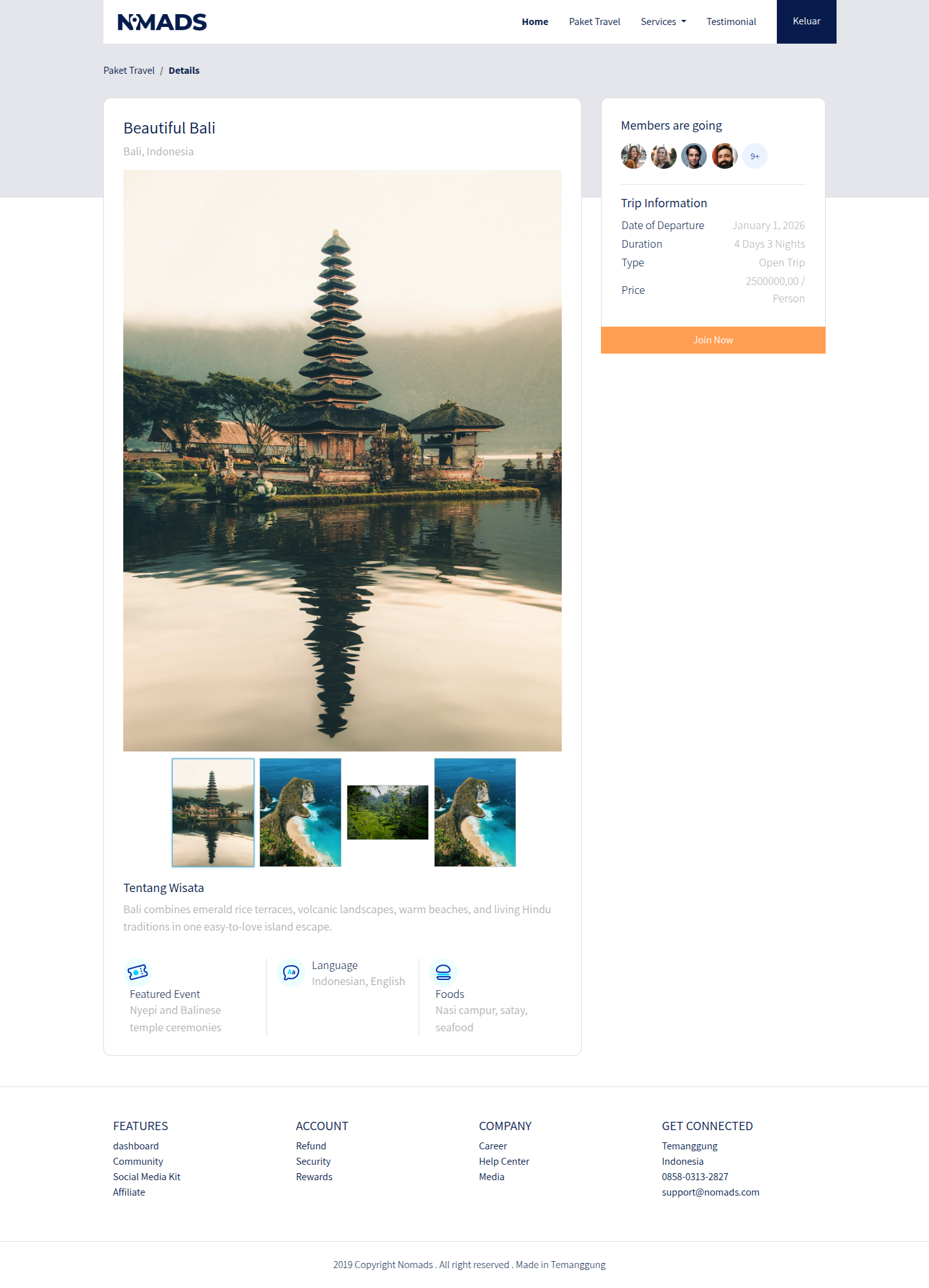
A package detail route looks up a trip by its slug and loads its associated galleries. The detail page presents the trip description and features alongside departure date, duration, type, and price. From this context, an interested visitor can choose the join action and continue into the authenticated booking flow.
3
Sign in and begin a booking
Checkout routes require an authenticated and email-verified user. Opening checkout creates an in-cart transaction and an initial traveler detail based on the signed-in account. This provides a starting traveler record, while the checkout screen allows additional traveler information to be managed against the booking.
4
Add traveler details
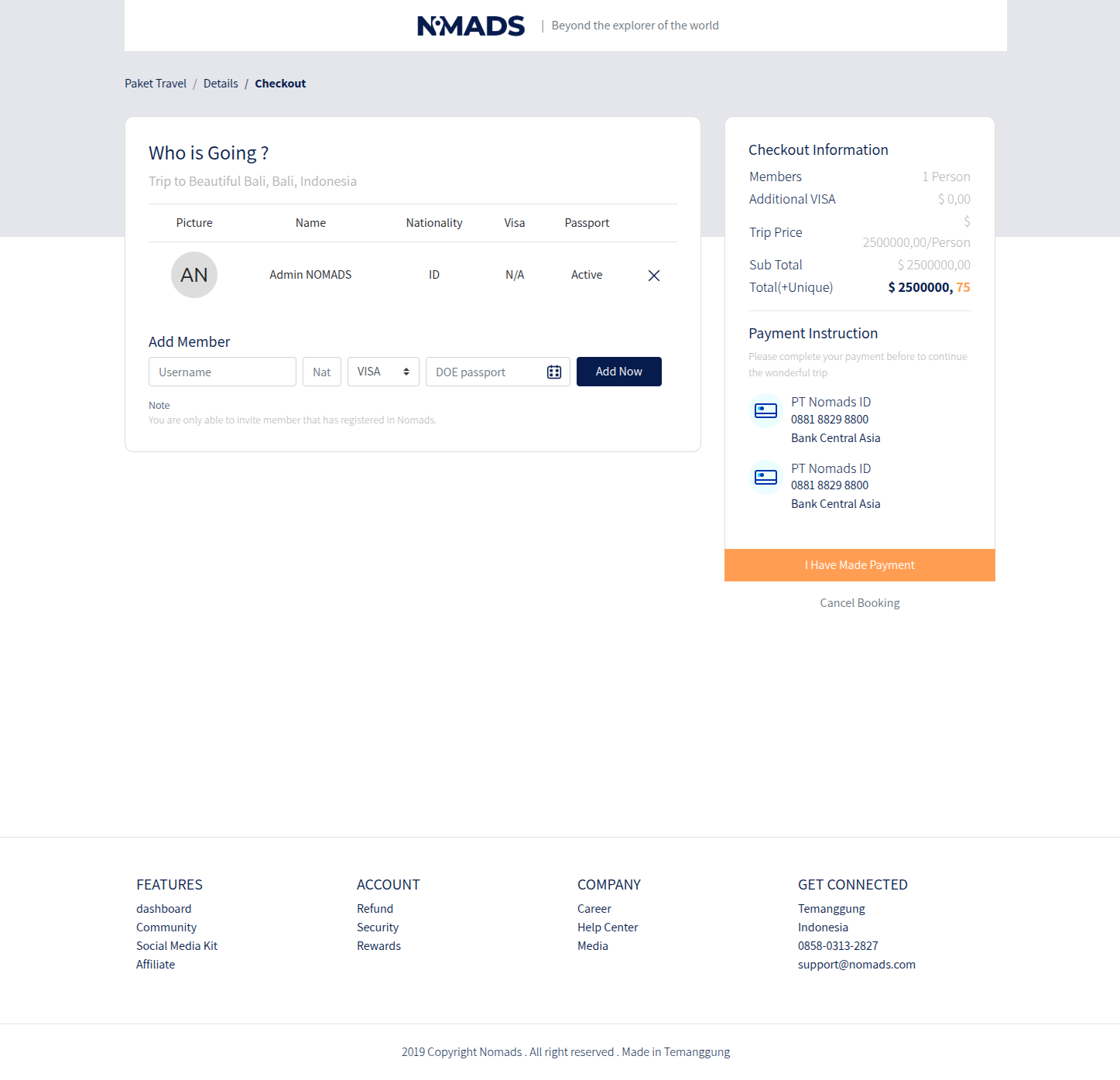
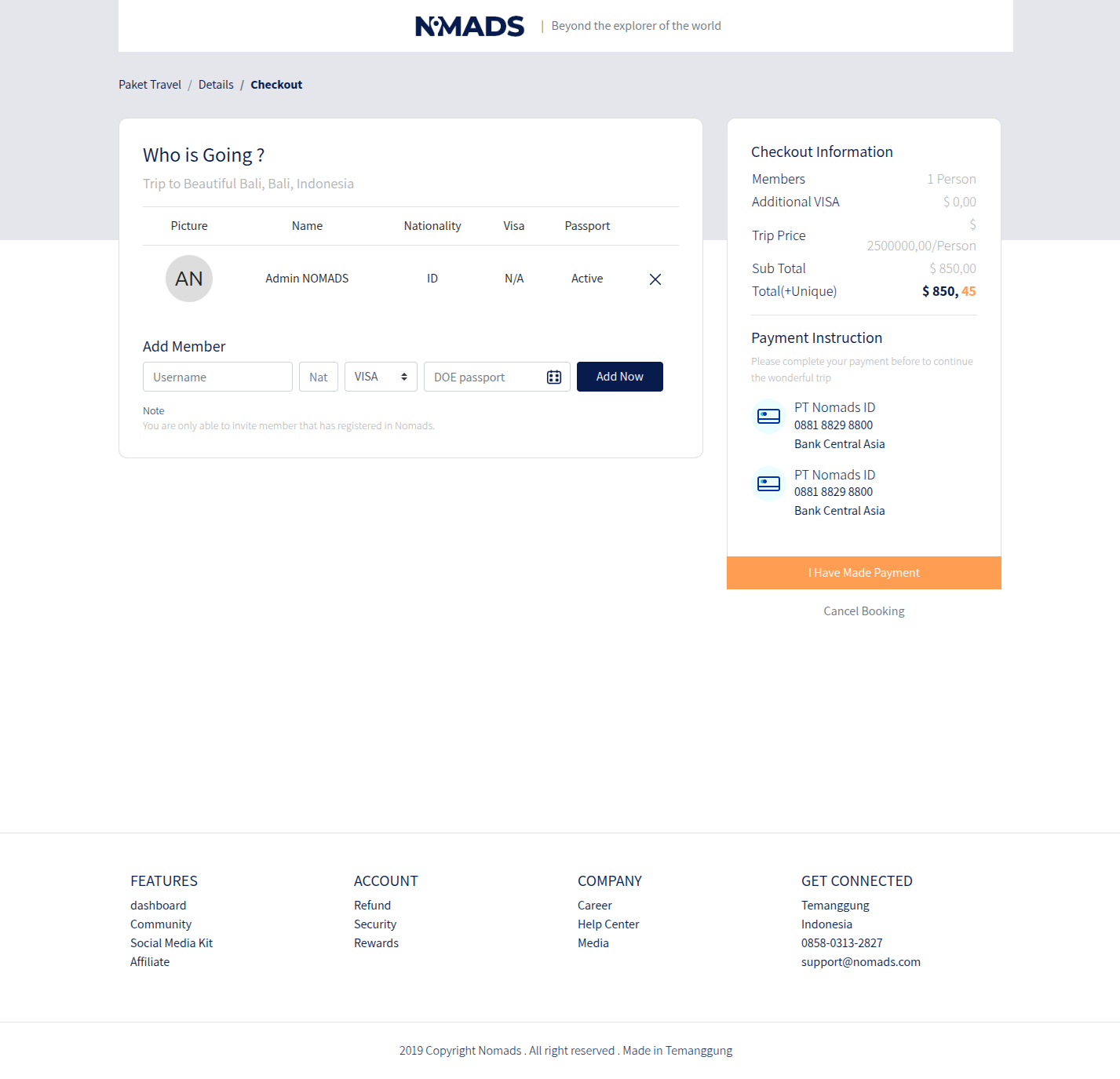
The traveler form records names and passport-related information, including nationality, visa requirement, and passport expiry fields in the transaction detail model. Adding or removing a traveler recalculates the transaction total, with an additional visa amount reflected by the controller. The code requires invited travelers to correspond to registered users by name, a constraint that should be made clear to users if this flow is maintained.
5
Submit payment confirmation
The checkout page displays payment instructions and an action for the user to say payment has been made. The success handler updates the transaction state to pending and displays a confirmation page. Source inspection did not find a payment-provider integration in this flow, so this should be described as manual confirmation rather than an automated payment checkout.
6
Review orders and administer content
Users can view their transactions in a dashboard and edit their profile, while administrators have routes for managing packages, galleries, and transaction statuses. The administrative package and gallery forms support content entry and image upload. This separates public trip discovery from authenticated account activity and staff-facing content maintenance.
Features, with interface evidence
The following screenshots are from the project’s documented interface areas. They illustrate the related modules; integrations and optional workflows may require configuration.
Feature 1
Travel package discovery
The homepage is the public catalogue entry point. It loads packages and galleries from the application and renders package cards, while the package detail page resolves the selected trip through a slug. This structure gives each trip a readable destination and a page that can hold the information needed before a visitor starts a booking. Package details include descriptive content, trip features, departure timing, duration, trip type, and price, allowing the visitor to consider the offer in context rather than relying on a title alone.
The repository also includes destination and gallery assets that support travel-focused presentation. The image paired here is a capture of the running home page with the seeded destination cards and their gallery images loaded; those photos appear as content within the application rather than as substitute evidence. Because the available README calls this a learning project, this description does not claim that the listed packages represent current bookable travel inventory or that the service is operating commercially.
- Data-driven travel-package cards on the landing page.
- Slug-based package detail pages with trip information.
- Package galleries connected to the package record.
Feature 2
Package detail and trip information
The detail view is the point where a visitor can inspect a specific package before deciding whether to join. It combines a gallery with the trip’s descriptive content and structured information such as departure date, duration, type, and price. Those fields are represented in the travel-package model and migration, so the detail page is backed by a persisted package record rather than a purely static card.
A join action connects the detail experience to checkout. In practical terms, this means the page needs to make the relationship between a selected package and its booking clear: the visitor is not simply contacting an agency, but initiating a transaction that will be associated with the package. The repository establishes this data flow, though no live booking environment or current package availability was verified.
- Gallery and descriptive package content.
- Departure, duration, type, and price details.
- A route from a package page into authenticated checkout.
Feature 3
Traveler management and booking totals
The checkout workflow models a transaction with one or more traveler details. The initial traveler is created from the authenticated user when an in-cart transaction is started. The user can add a traveler and remove an existing traveler, and the controller recalculates the total in response to these changes. Traveler fields include name, nationality, visa requirement, and passport expiry, reflecting the information the application’s transaction detail model is prepared to store.
The source also reveals constraints that matter when describing this feature. The add-member validation expects a matching registered user name, and the removal handler contains a misspelled surcharge field reference. Those details mean the feature should be presented as an implemented traveler-management workflow whose behavior deserves further quality review, not as a proven frictionless booking experience.
- An initial traveler associated with the signed-in account.
- Add/remove traveler actions in the checkout flow.
- Traveler and passport-related fields represented in transaction details.
Feature 4
Accounts, dashboard, and profile
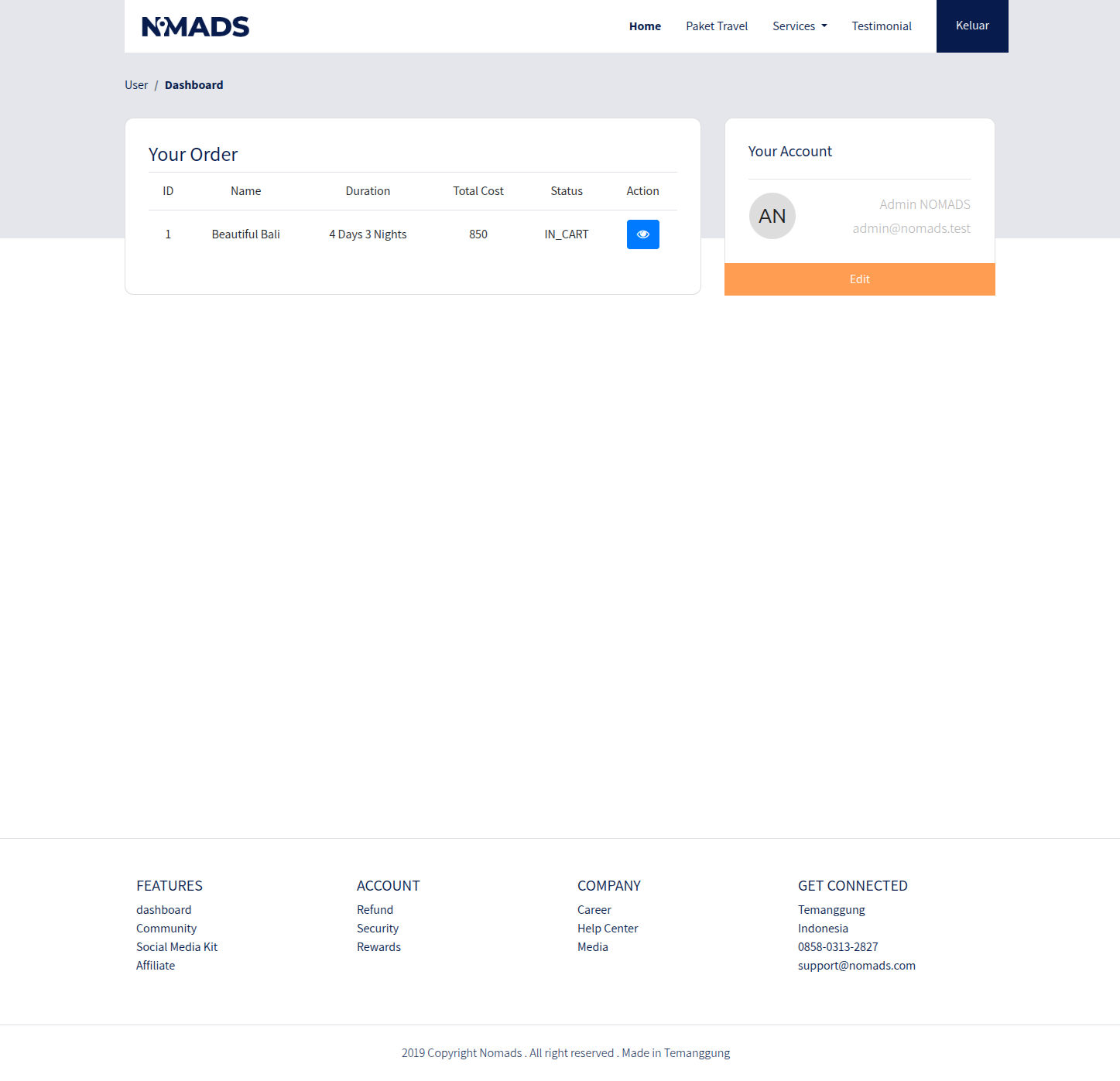
Nomads includes account authentication and email verification through Laravel UI routes. A user dashboard retrieves transactions associated with the current account and presents the order list and account details. A profile page lets the user update account information and upload an avatar, extending the application beyond a single anonymous purchase page.
The dashboard gives a returning traveler a place to see transaction status and access order details. Source review found that the order-detail lookup does not apply the same current-user filter as the dashboard list, so this authorization boundary merits correction before production use, and the profile screen gives the user a separate place to edit account information. This case study records the presence of the screens and routes without implying that every access-control path has been independently security-tested.
- Authentication and verified-email middleware around checkout.
- User dashboard for account transactions.
- Profile editing and avatar upload.
Feature 5
Administration of packages, galleries, and transactions
The admin area provides a separate set of management routes guarded by authentication and an admin middleware. Administrators can create, update, and delete travel packages; manage gallery images; and list or update transactions. Package records include trip details and a slug, while gallery records associate uploaded images with their package. These tools represent the content-management side required to keep a package catalogue current.
There are important caveats in the inspected implementation. The admin role middleware uses an assignment expression rather than a comparison in its role check, which makes the authorization logic unreliable. The transaction create screen is empty, and transaction status behavior relies on textual status names while the migration defines an integer field. These are source-level findings, not claims about exploitability in a running deployment, and they should be resolved before presenting the admin area as production-ready.
- Package CRUD and trip-content management.
- Gallery image upload and package association.
- Transaction listing and status editing.
Feature 6
Technical structure and implementation boundaries
The manifests identify PHP 8.1+, Laravel 10, Laravel UI, Vue 2, Bootstrap 4, Vite, Sass, jQuery, Axios, and Popper.js among the project’s dependencies. The app is primarily built with server-rendered Blade views, with Bootstrap and frontend assets supporting the interface. The domain models separate travel packages, galleries, transactions, transaction details, and users, making the central travel and booking entities explicit.
The README describes the project as Laravel practice, and the checkout uses static bank-transfer instructions followed by manual confirmation. No payment processor integration was found in the inspected checkout flow. The repository origin is `aryadwiputra/nomads`, while README screenshot links point to a different GitHub repository. The composer manifest declares MIT, but there is no root license file and third-party theme/image rights were not verified; asset provenance should be confirmed before redistribution.
- Laravel 10 and PHP 8.1+ backend.
- Blade pages with Bootstrap 4 and Vite-built assets.
- Separate package, gallery, transaction, and traveler records.
Nomads demonstrates a complete set of recognizable travel-agency surfaces: package discovery, trip detail, authenticated booking, traveler information, user account pages, and administrative content controls. Its strongest story is the connection between the public catalogue and the transaction records behind checkout. The nine repository screenshots make the project’s interface easy to review, while the underlying routes and models explain how visitors and administrators move through the product.
This portfolio description is intentionally careful about maturity. The README frames Nomads as a learning project, no runtime tests were performed for this case study, payment is manually confirmed in the inspected code, and source review surfaced authorization and data-model issues that should be addressed. The stack is Laravel 10, PHP 8.1+, Vue 2 dependencies, Bootstrap 4, and Vite. The record does not claim a commercial launch, booking-provider integration, current travel inventory, or a verified license for every bundled visual asset.