Vehicle Rental Platform
Laravel project
Vrom Live
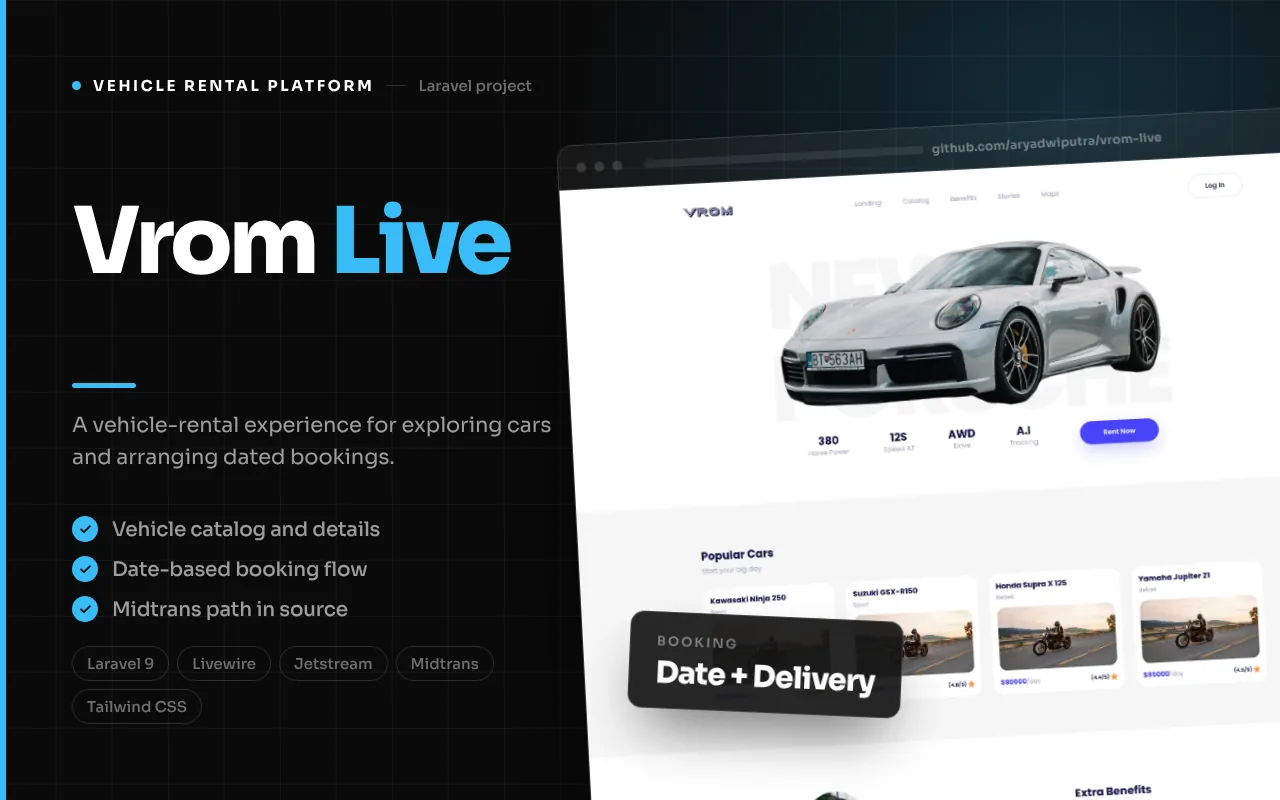
A vehicle-rental application for browsing cars, selecting rental dates and delivery details, and proceeding through a configured Midtrans payment flow.
Product overview
How the product fits together
Vrom Live is a vehicle-rental web application whose source code centers on a vehicle catalogue, item details, dated reservations, delivery information, and payment selection. The project’s product purpose is inferred from its car inventory, rental-date checkout, pickup-point map page, and booking records rather than from a dedicated product README. This case study therefore sticks to what the routes and controllers demonstrate instead of presenting a broader transportation marketplace that the repository does not establish.
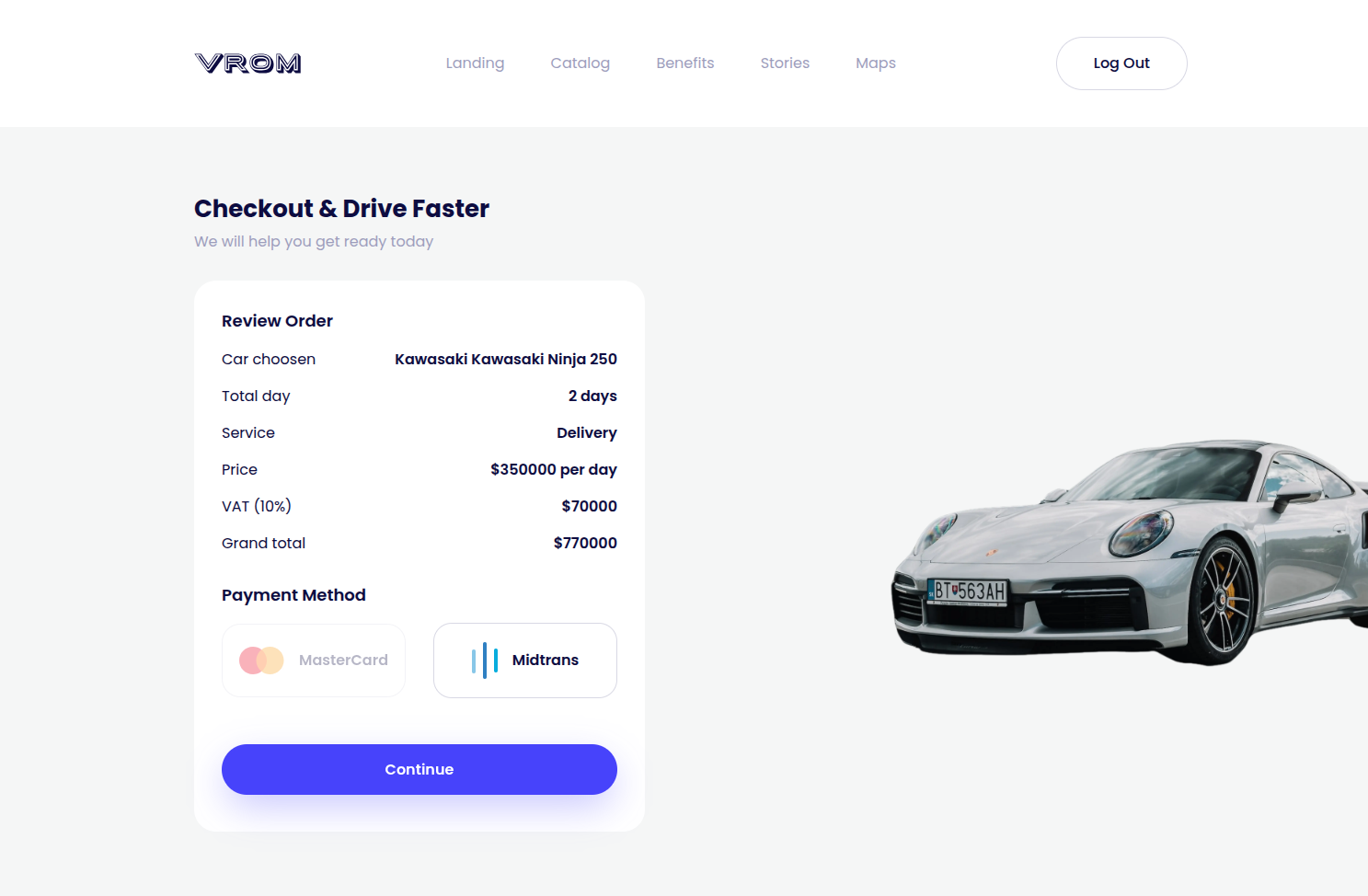
The customer journey begins with a public landing/catalogue view and can continue to a vehicle detail page. From there, a customer can open checkout for an item, provide rental dates and address information, and see a total calculated from the number of days, the item’s listed price, and a ten-percent tax. The payment area exposes Midtrans as an available option, while the alternative Mastercard option is displayed disabled in the inspected view. A Midtrans Snap flow is implemented in the payment controller, although callback routing and some controller/view wiring present gaps that should be addressed before this is represented as a verified live payment service.
The repository includes vehicle photography, thumbnails, a location-map template, customer account components, and administrator routes for brands, types, vehicles, and bookings. The screenshots below were captured from the running application after its seeded vehicle imagery had loaded; they show the rendered interface rather than substituting a standalone car photograph for a product screen.
The workflow
1
Browse vehicles
The landing controller loads a small set of recent inventory items with their brand and type relations. A visitor can move from the catalogue to a vehicle detail page, where the item is resolved by slug and other vehicles are shown as similar recommendations. The inspected route inventory contains a catalogue view, though its named route target does not align cleanly with the listed template, so runtime behavior was not verified.
2
Review the vehicle and choose dates
The item detail surface presents a vehicle and a path into checkout. Checkout collects a customer name, rental dates, and delivery address fields. The view uses a date-range picker, while the controller parses dates in a specified textual format and derives the rental duration from the submitted range.
3
Calculate the reservation total
The checkout controller multiplies the rental day count by the item price and adds ten-percent tax before creating a booking for the authenticated user. The booking record stores the dates, delivery details, price, status, and payment URL fields. The inspected validation does not establish thorough chronological checks for the date range, so the case study describes the coded formula without promising that every invalid range is rejected.
4
Select a payment path
The payment page displays Midtrans and Mastercard choices, but Mastercard is disabled and the controller validates the Midtrans path. For that path it requests an exchange rate, creates a Snap transaction, stores the generated payment URL, and redirects to the provider. Credentials, network dependencies, currency conversion, and provider configuration are prerequisites; actual provider transactions were not exercised.
5
Receive payment notifications
A callback controller maps Midtrans notification statuses such as settlement, pending, denial, expiration, or cancellation to booking payment status. However, no callback route was found in the inspected web or API route files, and the order identifier formats appear inconsistent between Snap creation and callback parsing. These are implementation gaps to verify, not functioning behavior to claim.
6
Manage inventory and bookings
The admin routes expose resources for brands, vehicle types, items, and bookings. The item controller includes form handling, image upload, slug generation, and soft deletion; the booking admin controller includes update/edit behavior. This provides the source structure for maintaining catalogue content and reservation records, though a full end-to-end runtime test was not performed.
Features, with interface evidence
The following screenshots are from the project’s documented interface areas. They illustrate the related modules; integrations and optional workflows may require configuration.
Feature 1
Vehicle catalogue and item detail
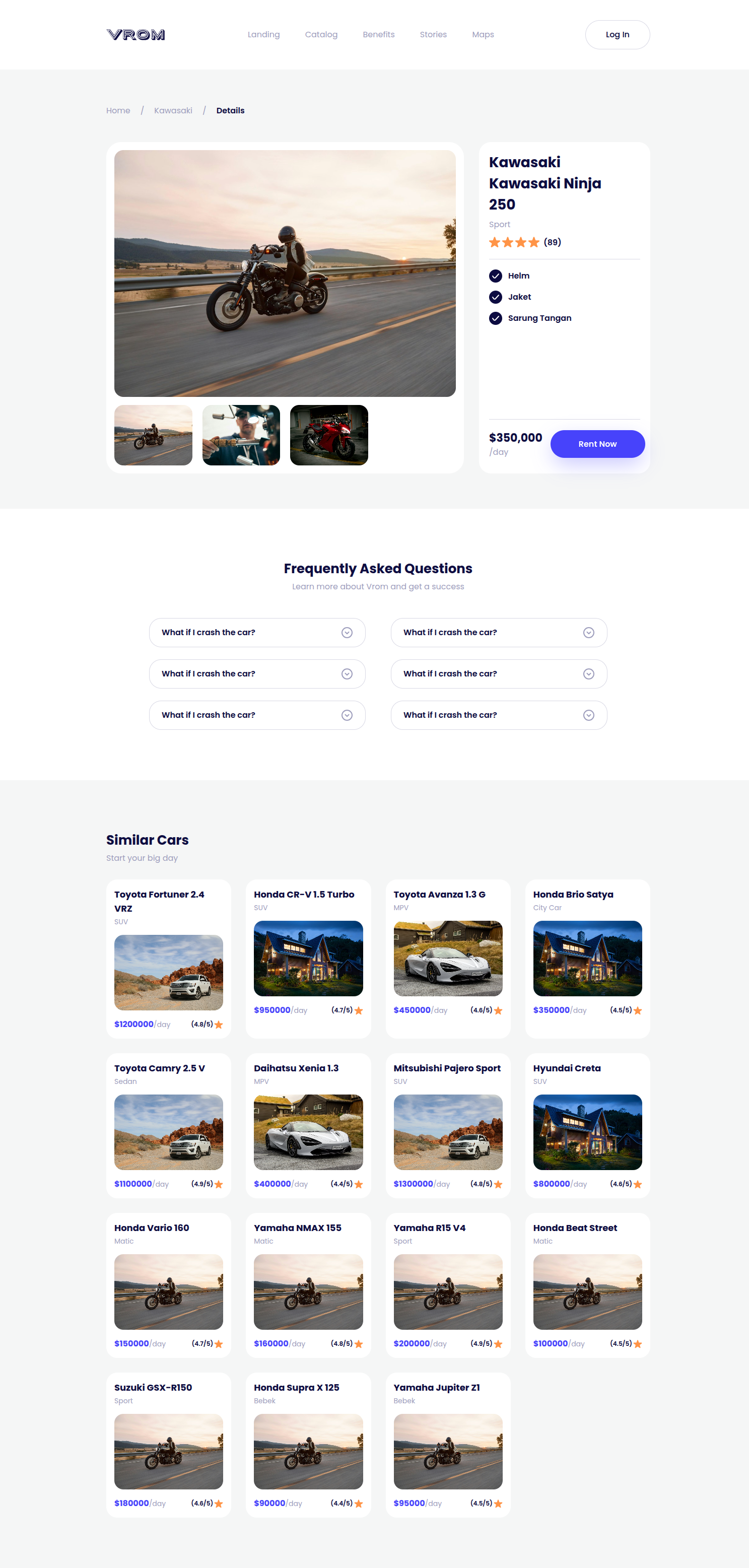
The catalogue model organizes vehicles through brand and type relationships. Each item carries a slug, photos, features, price, and rating-related fields, with an accessor that resolves its first stored photo as a thumbnail. The landing controller selects recent items, while the detail controller looks up a specific vehicle by slug and provides other inventory entries as similar vehicles. This makes discovery and comparison part of the same browsing path.
The local project was booted with seeded vehicle records and its missing public-storage link was restored before these runtime captures. The home screenshot shows the seeded vehicle catalogue with its car media loaded, while the detail screenshot focuses on the Kawasaki Ninja 250 gallery and its rental information. The project’s route/view naming has mismatches, including a controller rendering `landing` while the inspected view inventory lists `welcome`, and a catalogue link without a matching route; those paths are not represented as fully verified simply because the home capture rendered.
- Vehicle items associated with brand and type records.
- Slug-based detail lookup and similar-item suggestions.
- Uploaded multiple photos and a first-photo thumbnail accessor.
Feature 2
Date-based booking and delivery details
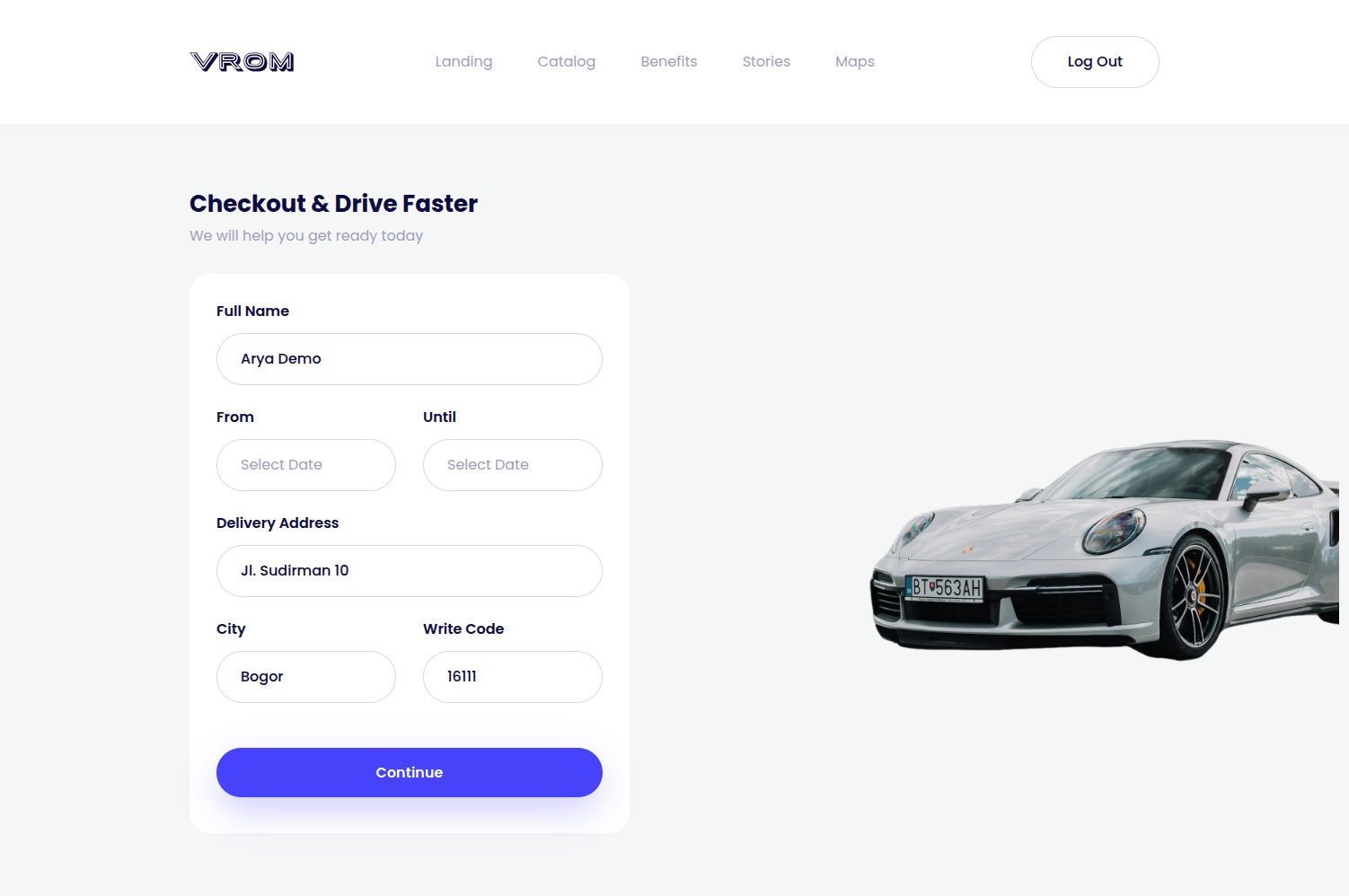
The checkout controller accepts a vehicle slug and displays a booking form with rental dates and delivery information. The collected fields include customer name, start and end dates, address, city, and postal code. The booking model stores the item and user relationship alongside dates, delivery details, total price, and status fields. An Alpine date-range picker is used in the view to help users choose a rental period.
On submission, the controller parses the provided date format and derives the number of days. It calculates the total as days multiplied by item price plus a ten-percent tax amount, then creates a booking and proceeds toward payment. Date ordering and duration protections were not verified in the source inspection, so this description is about the implemented formula rather than a guarantee that every edge case is handled safely.
- Rental start/end dates and delivery address fields.
- Booking record tied to an item and authenticated user.
- Documented total calculation includes rental duration and ten-percent tax.
Feature 3
Payment selection and Midtrans Snap
The payment controller loads a booking, accepts a payment-method selection, and supports a Midtrans Snap path. That path obtains an exchange rate, prepares a provider request, stores a payment URL, and redirects to the Snap experience. The checkout presentation includes a Mastercard choice but marks it disabled, so it should not be described as an implemented alternative tender. Provider credentials and successful network/provider responses are required for the payment path to operate.
A callback controller contains status mapping for capture, settlement, pending, deny, expire, and cancel notifications. But a callback route was not located in the route files inspected, and the creation/callback order ID formats appear mismatched. The success route’s view was also missing from the listed view inventory. For accuracy, the portfolio describes payment integration code as present but explicitly avoids implying a verified successful payment lifecycle.
- Midtrans Snap request and redirect code.
- Booking status mapping for documented provider notification states.
- Alternative Mastercard choice is displayed disabled in the inspected template.
Feature 4
Administration for inventory and bookings
Administrative routes include dashboards and resources for brands, types, items, and bookings, protected by authenticated and verified-user middleware plus an admin check. The item controller supports listing, create/edit forms, validation, slug generation, multiple uploaded photos, and soft deletion. Booking routes expose administrative editing and status changes, allowing operators to review and update reservation records through the application’s admin area.
The source also has visible gaps: booking create/store/show actions are empty, and the dashboard controller renders without the calculated metrics one might expect from its name. The admin tools should therefore be treated as a documented set of item and booking management screens rather than a completely verified rental-operations suite. I did not capture a Vrom Live administrator screen during this run, so this capability is described from its routes and controller source rather than illustrated by an unrelated login page.
- Brand, vehicle type, and inventory resource routes.
- Vehicle forms include descriptive fields, price, and image upload.
- Booking edit/update actions are present in source.
Feature 5
Pickup-point map and account surfaces
The view inventory contains a Leaflet-based map page with location cards, markers, and links for directions. Authentication and profile templates cover login, registration, password recovery, email verification, profile information, browser sessions, and two-factor challenges. Together these surfaces suggest an application intended to support both booking customers and operators, although the map’s backing data provider and route/controller were not found during inspection.
The map should not be framed as a verified live pickup-location service: the template expects location data, but the inspected routes/controllers did not establish how that data is supplied, and `/maps` returned 404 during runtime inspection. Similarly, the presence of two-factor and account templates demonstrates included interface surfaces, not the security posture of a deployed service. No login or unrelated screen is used as visual evidence for this map/account section.
- Leaflet map template with marker and direction-link UI.
- Authentication, profile, and account-security templates.
- Location data provider and route were not confirmed in the inspected source.
Feature 6
Implementation stack and integration boundaries
The Composer manifest declares PHP 8 and Laravel 9, with Jetstream, Sanctum, Livewire, Midtrans PHP, Yajra DataTables, and Guzzle. The frontend package manifest includes Alpine.js, Tailwind CSS, Vite, and related build tools. Blade templates provide the public pages and checkout, while the route/controller structure handles the main booking and payment actions. Vehicle and booking models persist the catalogue, customer, dates, delivery, and payment metadata.
The application integrates with Midtrans and also requests exchange-rate data during payment creation. Both rely on external services and valid configuration. Repository inspection found no product-specific demo URL, and the root README is boilerplate Laravel documentation. Composer declares MIT, but there is no separate product documentation establishing licensing for every image or external asset. This write-up does not claim that the app has been deployed, tested against live payment credentials, or verified as operational end to end.
- Laravel 9 and PHP 8 stack with Jetstream/Livewire.
- Midtrans PHP integration code and external exchange-rate request.
- Tailwind/Vite frontend tooling and Yajra DataTables dependency.
Vrom Live’s source describes a vehicle-rental workflow from inventory discovery through dated reservation, delivery details, and a configured Midtrans payment attempt. It also includes operator routes for managing vehicle taxonomy, items, and bookings, plus account and map templates. The portfolio now uses runtime captures of the rendered catalogue, vehicle detail, authenticated booking form, and payment-method page; source vehicle photographs remain app content rather than being passed off as interface screenshots.
The implementation is based on Laravel 9 and PHP 8 with Jetstream, Livewire, Sanctum, Midtrans, Tailwind CSS, and Vite. No project-specific README or public demo link was found. Several source-level issues, including route/view mismatches, missing callback registration, payment identifier concerns, and unverified map data, mean that the portfolio copy deliberately describes the code’s intended flow without representing it as a tested or production-ready rental service.