Multi-vendor Marketplace
Laravel project
Marketplace
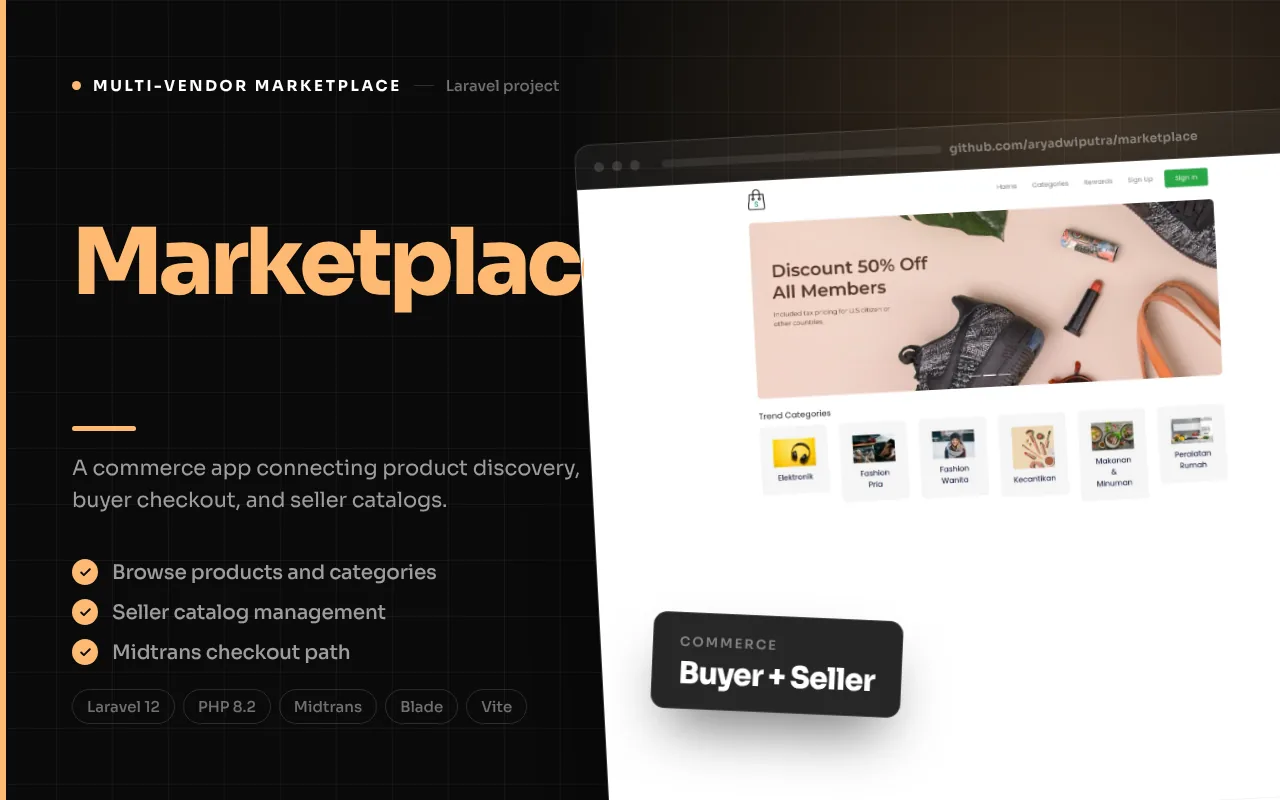
A product marketplace with buyer browsing and checkout, seller product and gallery management, and administrator controls for catalog data and accounts.
Product overview
How the product fits together
Marketplace is a Laravel web application organized around product discovery, a buyer cart and checkout, seller-owned product management, and administrator catalog controls. The repository README is the default Laravel template rather than a product brief, so this description is grounded in routes, controllers, models, and the assets present in the source. It does not imply that a public marketplace is currently operating or that the included inventory represents real sellers.
The buyer journey runs from a home page and category browsing to a product detail view. A customer can add a product to a cart, review the cart, complete checkout with shipping and customer details, and continue to a Midtrans payment redirect. The application also contains shipping-cost endpoints that call RajaOngkir. On the seller side, authenticated users have product and gallery routes, along with store and account settings. Administrators manage categories, products, galleries, and user roles.
The feature images below are runtime captures of the Marketplace interface: public catalog and product detail, authenticated seller product management, and authenticated administrator catalog management. Product photography is shown only inside the captured application screens; it is not substituted for an app screenshot. The buyer cart was empty during this audit, and the external shipping quote was not configured, so those flows are described from source rather than presented as verified checkout evidence. Source inspection also surfaced seller ownership, cart authorization, callback-identifier, and dashboard implementation gaps, so the copy presents implemented code paths without claiming they are fully secured or production-validated.
The workflow
1
Discover categories and products
The home controller loads a limited set of categories and products. Category pages list or filter products, and product detail resolves an item by slug while loading its galleries and seller relation. From a detail page, the buyer can invoke add-to-cart, which stores the selected product for the authenticated account.
2
Review the authenticated cart
Cart routes require authentication and provide cart display, removal, and a success page. Each cart row relates a user to a product. The detail controller’s add-to-cart handler relies on the current authenticated user, while its route is public in the inspected route file; this access boundary should be reviewed and described as a code limitation.
3
Provide checkout and shipping information
The checkout controller accepts customer and shipping fields, creates a transaction and detail rows, clears the cart, and requests a Midtrans redirect. RajaOngkir endpoints support province/regency lookup and shipping-cost requests. External API credentials and payment configuration are needed, and the inspected callback’s order lookup appears inconsistent with the code sent to the provider.
4
Manage seller products and galleries
Authenticated seller routes expose product listing/detail, create/update, and gallery upload/delete actions, as well as store settings. Products have seller, category, and gallery relationships. The inspected seller product queries find records by ID without consistently applying current-seller ownership filters, an important limitation to address before enabling multiple sellers.
5
Administer catalog and users
Admin routes are protected by authentication and an admin middleware. Administrators can manage categories, products, product galleries, and users, including assigning admin or user roles. This provides a central control surface for marketplace data, distinct from seller-facing product management.
6
Review transactions and operations
The data model includes transaction totals, shipping amounts, status, user, and transaction details with item-level shipping and tracking fields. However, the seller transaction controller is empty and the seller navigation item points to a placeholder. The admin dashboard’s transaction metrics are commented out. These are clear follow-up items rather than features to overstate.
Features, with interface evidence
The following screenshots are from the project’s documented interface areas. They illustrate the related modules; integrations and optional workflows may require configuration.
Feature 1
Product and category discovery
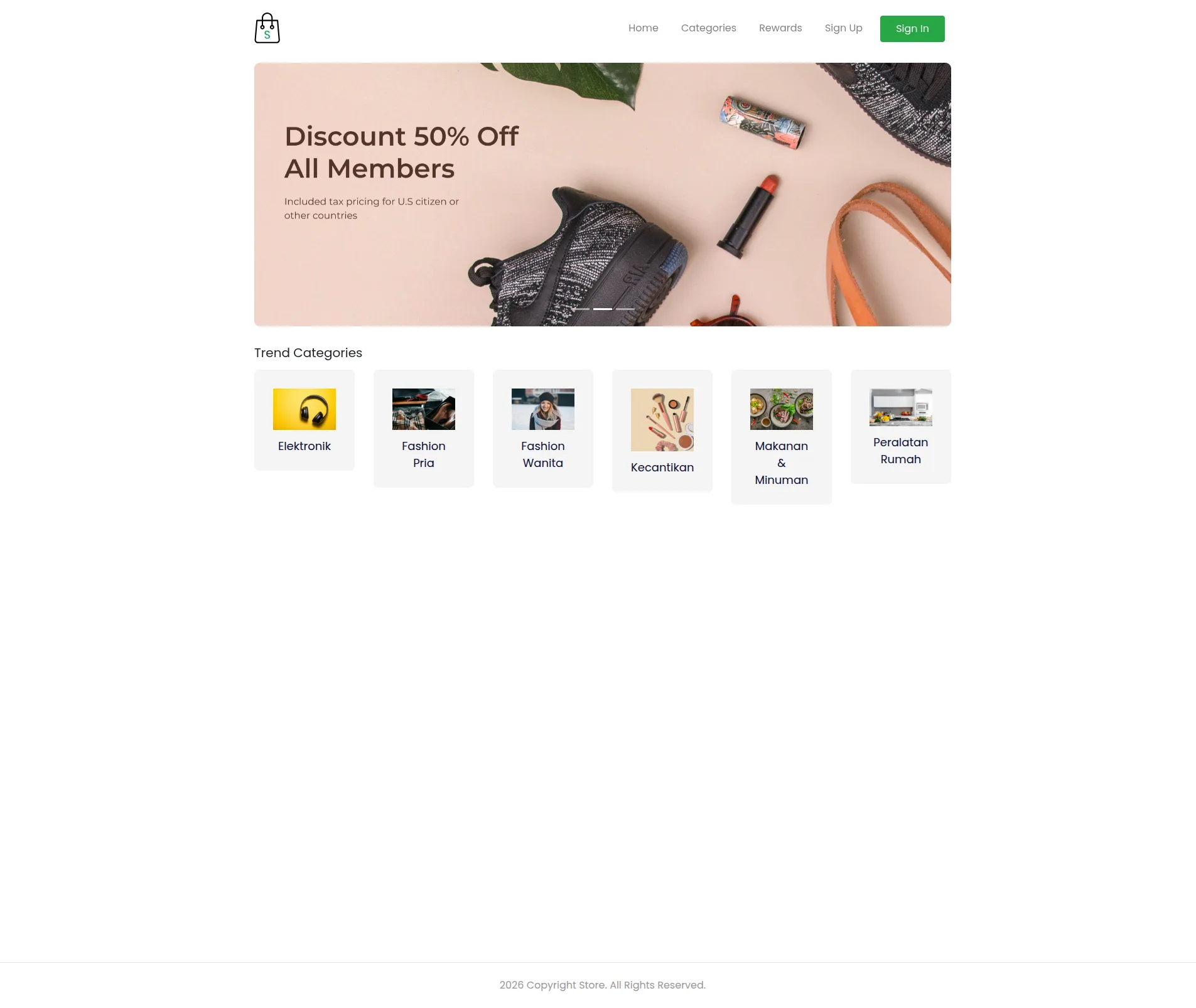
Marketplace pages organize catalog content through categories and products. The home controller loads up to six categories and eight products, while category routes show products and support category-specific filtering. Product detail resolves by slug and loads its gallery and seller, placing descriptive content and product imagery together before the buyer makes a cart decision.
The product model records seller, category, price, description, slug, and gallery relations. The image paired with this section is a runtime capture of the public catalog, with product photographs appearing as content inside the rendered application interface. Product availability, seller authenticity, and actual marketplace operations were not confirmed.
- Home page with product and category selection.
- Category listings and category-filtered product results.
- Slug-based product detail with seller and gallery relationships.
Feature 2
Buyer cart and checkout
The buyer flow moves from product detail into an authenticated cart. Cart routes support displaying cart entries and removing a cart item, then provide a success destination. Checkout gathers shipping/customer information, creates a transaction plus detail rows, clears cart data, and requests a Midtrans payment redirect. The transaction model includes totals, shipping, status, code, and a user relationship; details store item-level information and tracking/shipping status fields.
The inspected checkout controller does not show comprehensive validation of the submitted checkout fields. The cart-delete handler finds a cart record by ID without visibly checking its owner, and add-to-cart is routed publicly even though its controller uses the current authenticated user. During this runtime check the authenticated cart was empty, so no populated cart or checkout screenshot is attached. These source-level concerns should be corrected and tested; the portfolio describes the intended code path without promising a secure checkout implementation.
- Authenticated cart routes for viewing and removing items.
- Transaction and transaction-detail records created during checkout.
- Midtrans redirect flow and cart clearing in the controller.
Feature 3
Shipping data and external cost lookup
Marketplace includes endpoints for province/regency data and shipping-cost lookup through a RajaOngkir service. This connects address selection to a shipping estimate in the checkout journey and acknowledges that a product transaction may include delivery as part of its total. The transaction model includes shipping-related values, and transaction details include shipping status and tracking fields, creating a place in the data model for fulfillment progress.
The endpoints make external HTTP requests, so their usefulness depends on credentials, service availability, and valid request inputs. No live API credentials or returned shipping quotes were tested. The runtime cart page had no items and could not produce a shipping quote, so no screen is attached to this source-described integration. The portfolio therefore names the integration as code in the repository, not as a confirmed active carrier or a guaranteed delivery estimate.
- Province and regency lookup API routes.
- RajaOngkir shipping-cost service integration code.
- Shipping and tracking fields in transaction detail data.
Feature 4
Seller product and gallery management
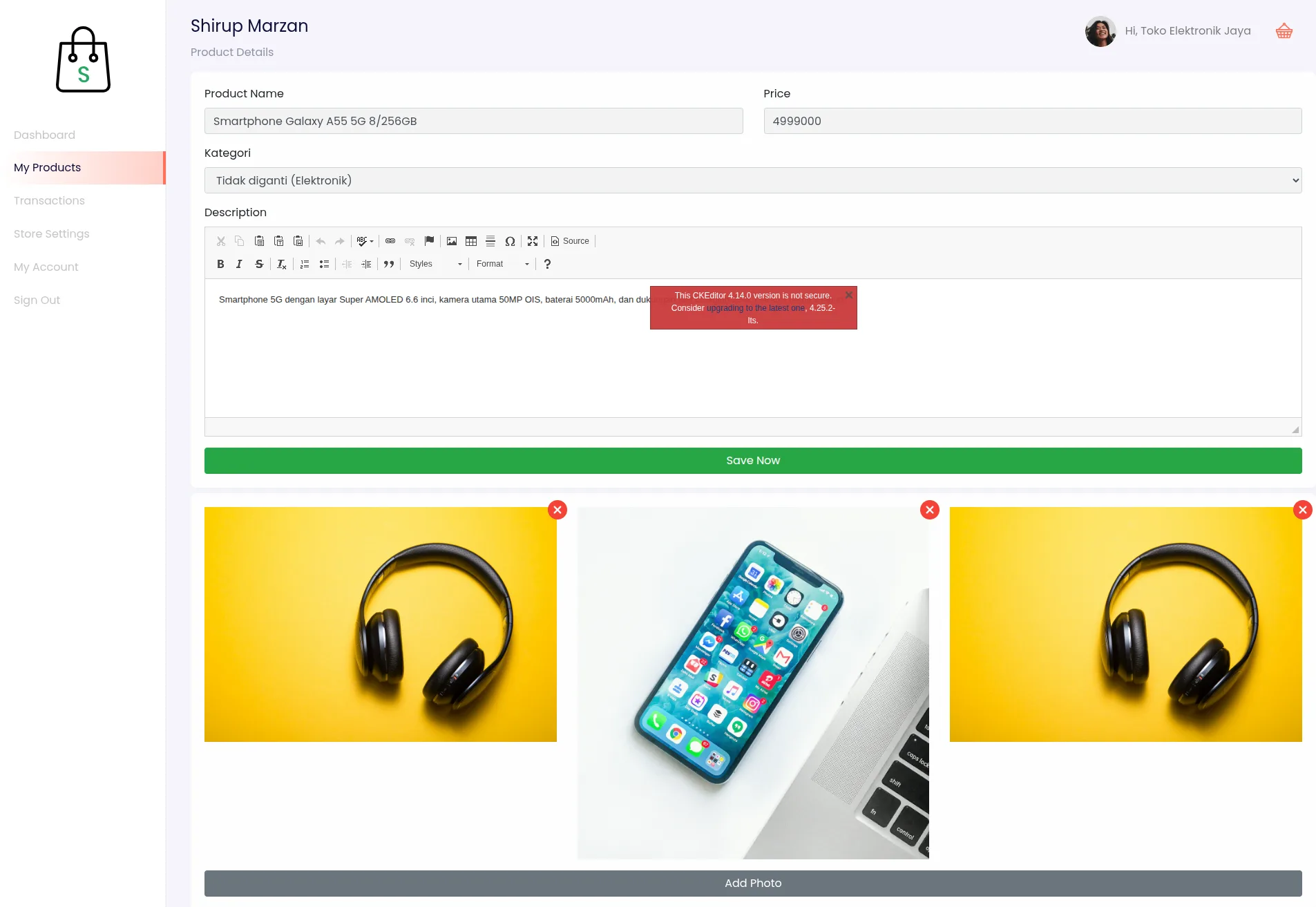
Seller-facing dashboard routes cover product listing, product detail, create/update, gallery upload and deletion, plus store and profile settings. A product is related to a seller and category and may have multiple gallery records. That structure allows a seller workflow to maintain catalog content without routing every product edit through a central administrator. File upload handling appears in the dashboard product controller, making image management part of the product-maintenance surface.
The inspected seller product queries and ID lookups do not consistently filter by the current user. That can expose cross-seller visibility or editing concerns and must be reviewed before this is represented as a safe multi-vendor control plane. The seller transaction controller is empty, while the dashboard navigation includes a transaction link that points to `#`; order-management functionality for sellers is therefore not claimed here.
- Seller product listing, detail, create, and update routes.
- Gallery upload and delete actions.
- Store settings and profile management routes.
Feature 5
Administrator catalog and account controls
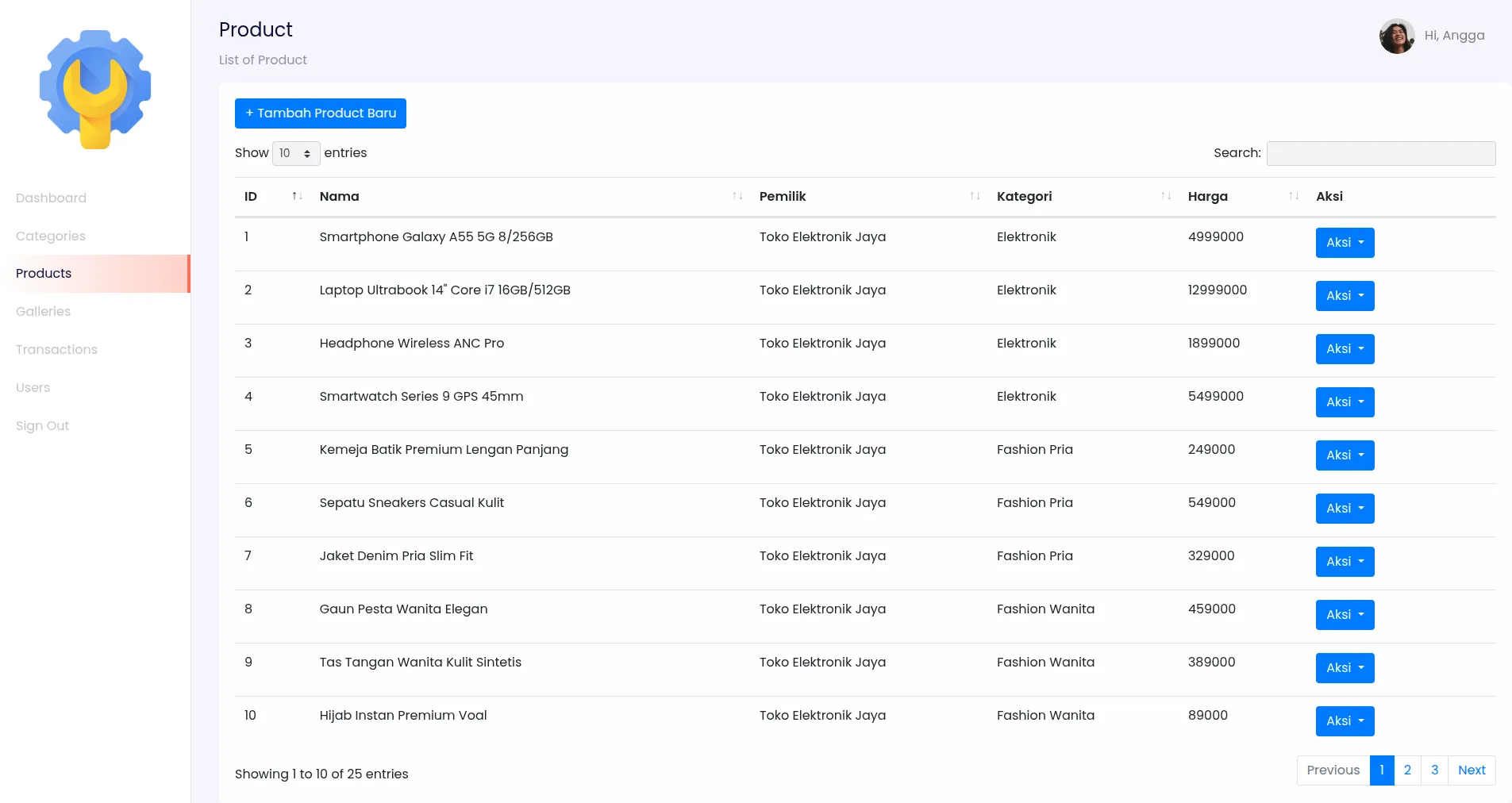
An admin middleware checks the account role and protects routes for category, product, gallery, and user administration. Category management supports CRUD and image storage; product administration supports create, edit, update, and deletion; gallery management has corresponding CRUD methods. User administration can create and update accounts and validates roles as admin or user. These tools form the centralized layer that controls catalog structure and platform accounts.
The admin dashboard controller renders its page, but customer, revenue, and transaction metric queries are commented out. This write-up does not treat those as live analytics. The source also has a category route parameter named `id` used as a slug and a mismatch between category foreign-key naming in filtering and the product model, both of which should be reconciled to ensure catalog filtering works consistently.
- Admin route group guarded by auth and admin middleware.
- Category, product, gallery, and user administration.
- Role assignment supports admin and user values.
Feature 6
Implementation stack and integration boundaries
The Composer manifest declares PHP 8.2+ and Laravel 12, with Midtrans, Yajra DataTables, and Laravolt Indonesia dependencies. Frontend packages include Vite, Alpine, Tailwind, Bootstrap, Sass, jQuery, and Axios. Blade views and Sass provide the primary presentation layer. The repository contains a mixture of product photos, a wide banner, store identity assets, and category illustrations that support an e-commerce visual language.
The root README is boilerplate Laravel documentation, the project has no separate LICENSE file, and composer package metadata alone does not establish a clear project-wide licensing grant for every asset. The Midtrans callback uses an order ID lookup that appears mismatched with the code generated during checkout. Repository code also includes user/store/product fields but no independently verified live demo. The authenticated administrator product catalog is attached as interface evidence; it is not a visual demonstration of payment or shipping integrations. This case study therefore records its source-level architecture and integrations without asserting operational payment success or production readiness.
- Laravel 12 / PHP 8.2+ backend.
- Midtrans payment and RajaOngkir shipping integration code.
- Blade, Vite, Tailwind/Bootstrap assets, and Yajra DataTables.
Marketplace’s source brings together three intended sides of a commerce workflow: buyer discovery and payment, seller catalog maintenance, and administrator controls. The strongest documented path follows a product from category and detail pages into a cart and checkout, with shipping and payment code alongside it. Seller products and galleries are modeled separately from admin catalog controls, while transaction records leave room for order status and shipping tracking.
The repository uses Laravel 12 and PHP 8.2 with Midtrans, RajaOngkir request code, Blade, Vite, and a mixed Tailwind/Bootstrap frontend toolchain. Runtime screenshots of the public catalog and product detail, authenticated seller product editor, and authenticated administrator product catalog are included; no project-specific product README was found. The cart was empty during the runtime review and external shipping/payment services were not exercised. Seller ownership filtering, cart authorization, callback order lookup, category filtering, and unfinished transaction views are significant follow-up work. This case study describes those capabilities as evidenced in source and does not claim a secure, tested, or actively operating marketplace deployment.